

Special Login Folders
Predefined folders under Logins for disabled logins, SQL accounts and Windows accounts.
Virtual Folders sorts the logins under Security → Logins into three predefined folders, so you find a login by its kind, the same way it groups SQL Server Agent jobs (see Special SQL Agent Folders).
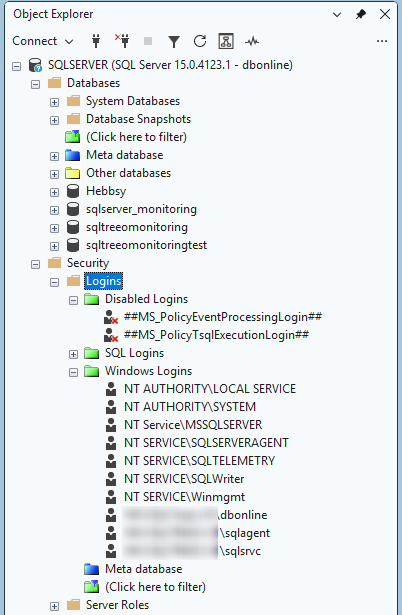
- Disabled Logins: logins that are disabled.
- SQL Logins: SQL Server logins (SQL accounts).
- Windows Logins: Windows users and Windows groups.
A disabled login goes to Disabled Logins whatever its type. If you switch that folder off, a disabled login goes to its SQL or Windows folder instead. Logins of another kind, such as certificate logins and Entra ID accounts, stay directly under Logins, next to the folders you made yourself.
Each folder can be switched off on the Options page under Security: logins and roles.
To find the logins, the add-in runs SELECT name, type, is_disabled FROM sys.server_principals WHERE type <> 'R' in the master database each time you expand or refresh the Logins node. It does nothing else on the server. If the query fails, for example because the server cannot be reached, the logins are simply not grouped and no message is shown.