
SSMS add-in

Master Your Database Workflow
Virtual Folders in SSMS

Organize the Object Explorer in SQL Server Management Studio with your own folders.

Adding virtual folders in the Object Explorer

For Individual users

Effortlessly organize your objects by project, client, or category, just the way you work.

For Teams

Teamwork made simple with shared access to virtual folders. Everyone sees the same folder structure.

By setting up custom folders, you can better organize your database environment in SSMS, making it easier to navigate through complex systems as they grow over time!
SQL Server Agent jobs grouped in folders

Get more from SSMS with built-in SQL Agent folders that clean up clutter and streamline your workflow

Organize your jobs in a better way to remove the clutter. Disabled, replication and Reporting Services jobs get their own folder automatically.

How the SQL Agent folders work

As your database grows, clutter can slow you down. By grouping jobs and objects into custom folders, you gain a clear view and faster navigation. No more hunting through long lists.
Click here to filter in the Object Explorer

Find what you need
Quickly find the objects you need, no effort wasted

Type a few characters directly in the tree. Use ; for multiple criteria and % or _ as wildcards, without opening the standard filter dialog.

About (Click here to filter)
We don't touch your SQL. We just make it easier to work with.
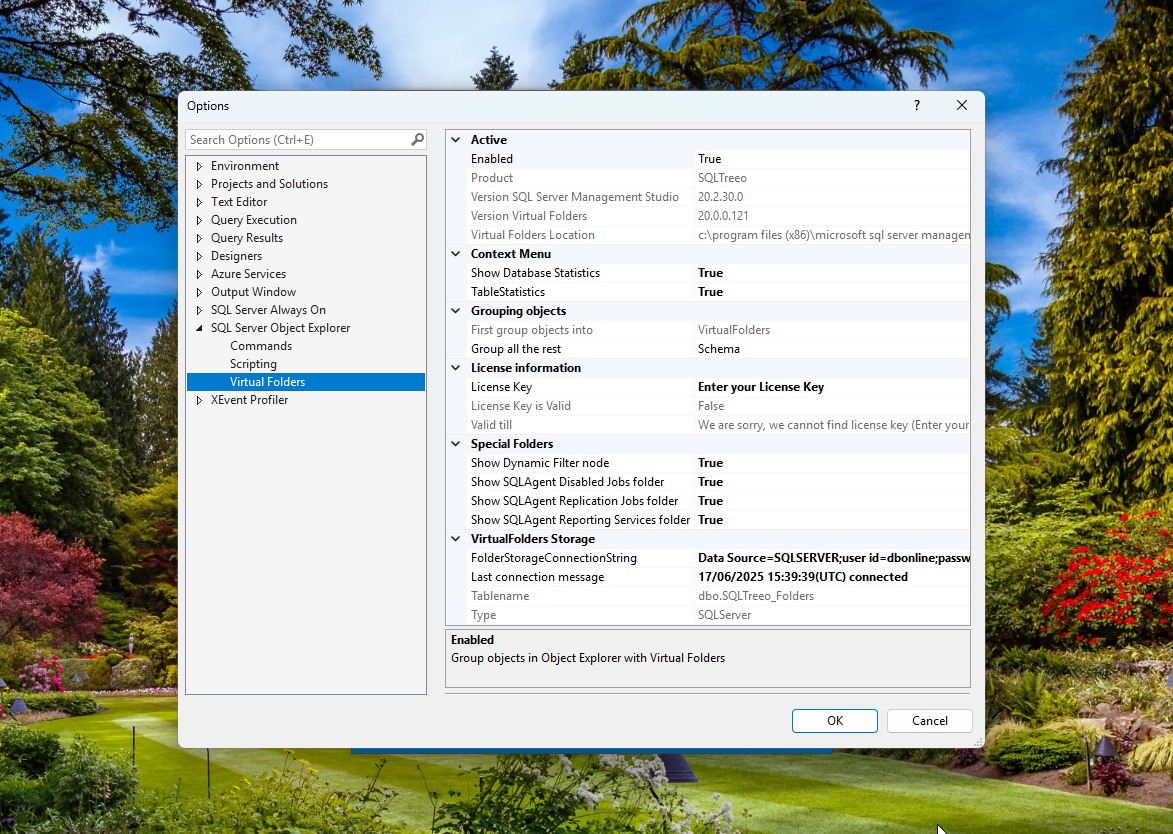
Virtual Folders options in SSMS

Your SQL Server stays untouched
we just help you organize it better

Folders exist only inside SSMS. To keep them between sessions, the add-in stores them in one small table on a SQL Server of your choice.

How persistence works
Think of it as your SQL sidekick: always ready, never grumpy, and obsessed with keeping your chaos under control.

Quick access to what matters most

Table row counts and size

Table row counts and size in MB

Database and log sizes

Database and log sizes and free space

No hidden fees. No inbox surprises. Just honest purchases and emails you actually need.

Start adding Virtual Folders to your SSMS

Download the add-in for your SSMS version, unblock the zip file, extract it into the Extensions folder and restart SSMS. The 30-day trial starts automatically.

Pricing plan

Plans That Fit You

For Individual Users

$15
for 1 year
  • Includes one license (sent to the email used at checkout)
  • Virtual Folders (only visible to you)
  • Including all future updates
  • Support
Buy now

For Teams

$49
for 1 year
  • Includes one license (sent to the email used at checkout)
  • Shared Virtual Folders (visible to all team members)
  • Including all future updates
  • Support
Buy now
Satisfied customers

Trusted by SQL Server teams since 1998

  • unilever
  • hilfiger
  • interpay
  • shell
  • equens
  • conimex
  • koningaap
  • reddion
  • kpn
  • getronics
  • campai
  • telserv
  • stmr
  • rabobank
  • opta
  • mineco
  • london
  • lloyds
  • kvk
  • justitie
  • hypotheker
  • hosting-nl
  • cendris
Testimonials

What our customers say

Based on my experience, SQLTreeo is very passionate about satisfying their customer’s needs. Always great output, solid solutions and quick responds by SQLTreeo when needed.
Maurits Hafkenscheid
Manager Operations & Development – TelServ
Optimizing and maintaining our databases was a daunting task for us. We did not have the proper knowledge and were unable to provide 24/7 support for our customers. SQLTreeo was able to reduce our processing time by 50% and is proactively supporting (monitoring) our systems so there is little to no business impact. Thanks to SQLTreeo we are in control of our Microsoft SQL servers.
Bart Delpeut
System Administrator at KPN
SQLTreeo is our virtual teammate that never sleeps and continuously monitors the performance of our SQL production environment. They provide us with tailor-made SQL solutions that meet our exact demands.
Martijn Reuzenaar
Application Manager – VoIP & Communication Technologies
Our production MS SQL standard edition databases with billions of records became too large to handle which resulted in performance degradation and long DR times. In SQLTreeo we’ve found a partner able to find a cost effective solution to keep our databases small in an automated and cost effective way. We will surely make use of the expertise of SQLTreeo for our future projects.
Richard Beute
SpeakIntelligence
SQLTreeo virtual folders fills in the missing gap that SSMS lacks. Makes database development a breeze now.
Craig Geil
Owner – Geil Tech