Windows desktop

Look inside a SQL Server backup.
Restore only what you need.

Open a SQL Server backup without a SQL Server, see what is inside and restore only the tables you need.

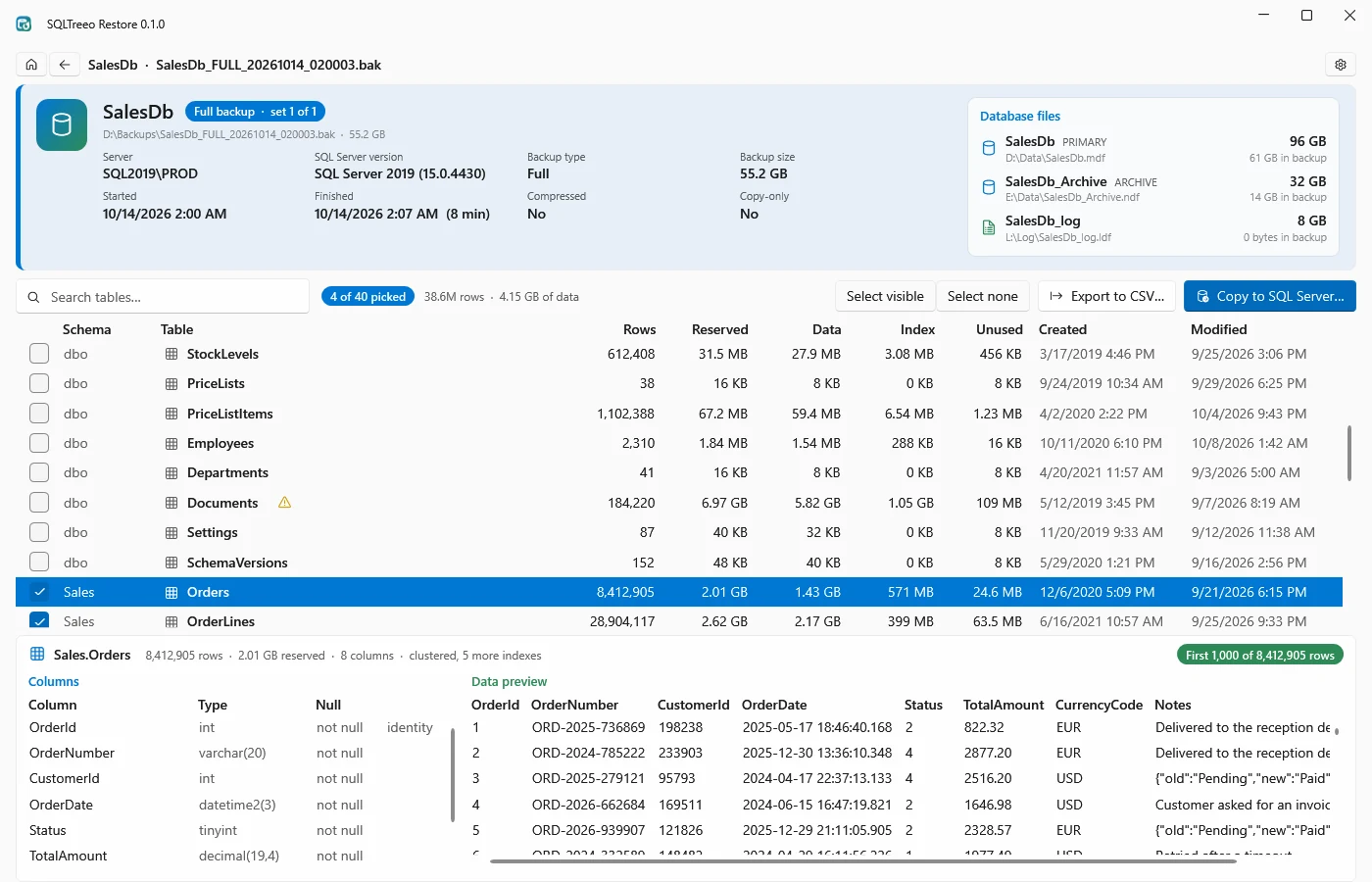
SQLTreeo Restore showing a SQL Server backup: the backup set with server, version, dates and size, the database files, the list of tables with rows and sizes, and the columns and first rows of the selected table

A full backup of 55 GB, opened without a SQL Server: its database files, 40 tables with row counts and sizes, and the first rows of the selected table. The screenshots on this page show sample data.

Why

Three questions a backup file does not answer

A .bak file is a black box until you restore it, and restoring means a server with enough room and a lot of waiting. SQLTreeo Restore answers the questions first.

What is in this file?

Which database, from which server and SQL Server version, full, differential or log, when it was made, how big it is and whether it is compressed or encrypted. A file with several backup sets lists every one.

Which tables, and how big?

Every user table with its row count and size, its columns and data types, and its first 1,000 rows, read straight from the backup. No restore, no waiting for a whole database to come back.

Can I get just these tables back?

Tick the tables you need and export them to CSV, or copy them into a database on any SQL Server. The rest of the backup stays where it is.

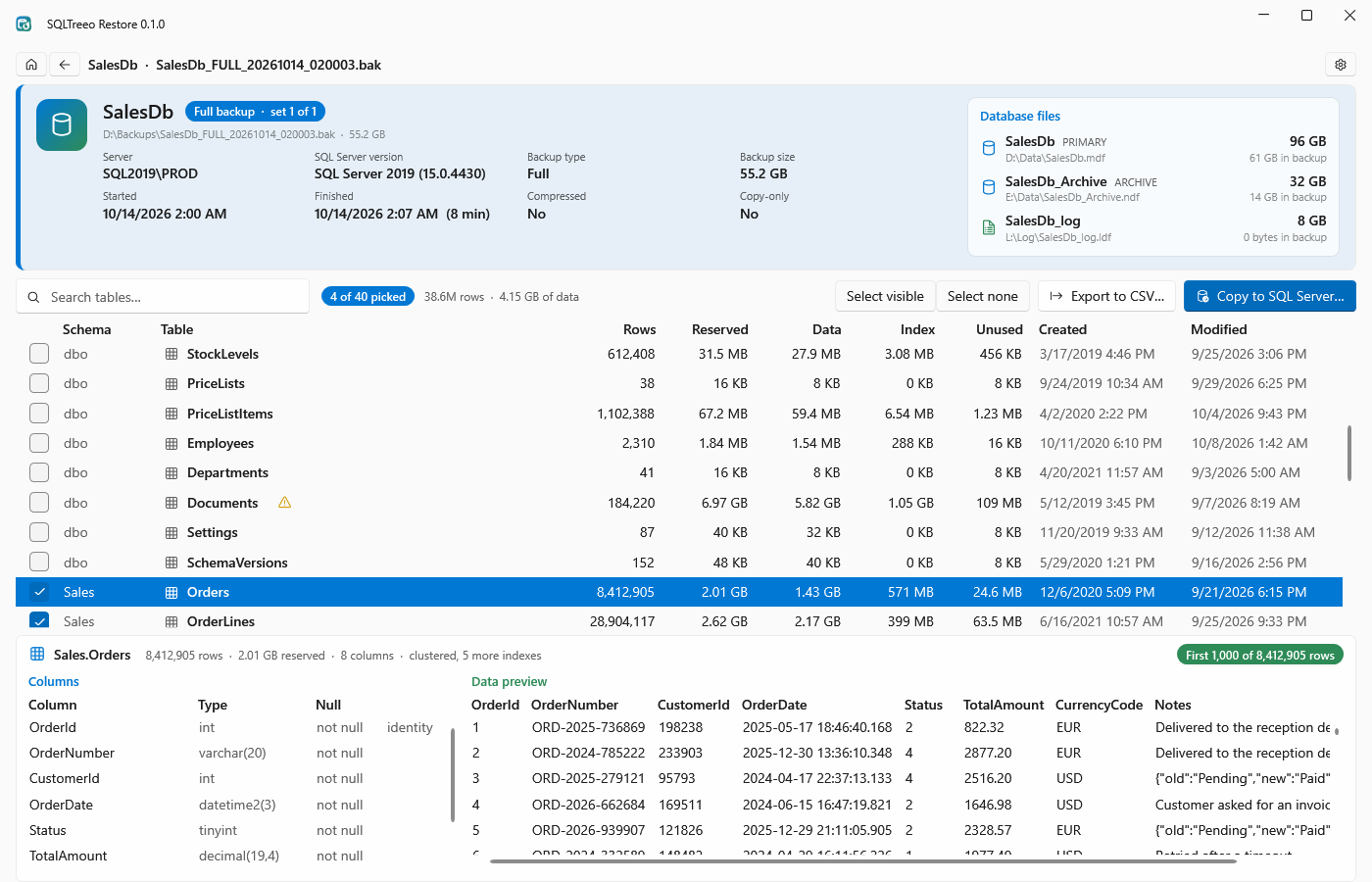
Backup page with the backup set, the database files with their sizes in the backup, and the table list with rows, reserved, data, index and unused sizes

See what is inside, without a SQL Server

Open a .bak file from the start page, from the list of recent files, or by dragging it onto the window. You see what RESTORE HEADERONLY and FILELISTONLY would show, and the tables that those commands cannot show.

Large backups are read in one pass with progress in percent and gigabytes, and you can cancel. The file is never locked: you can move or delete it while it is open.
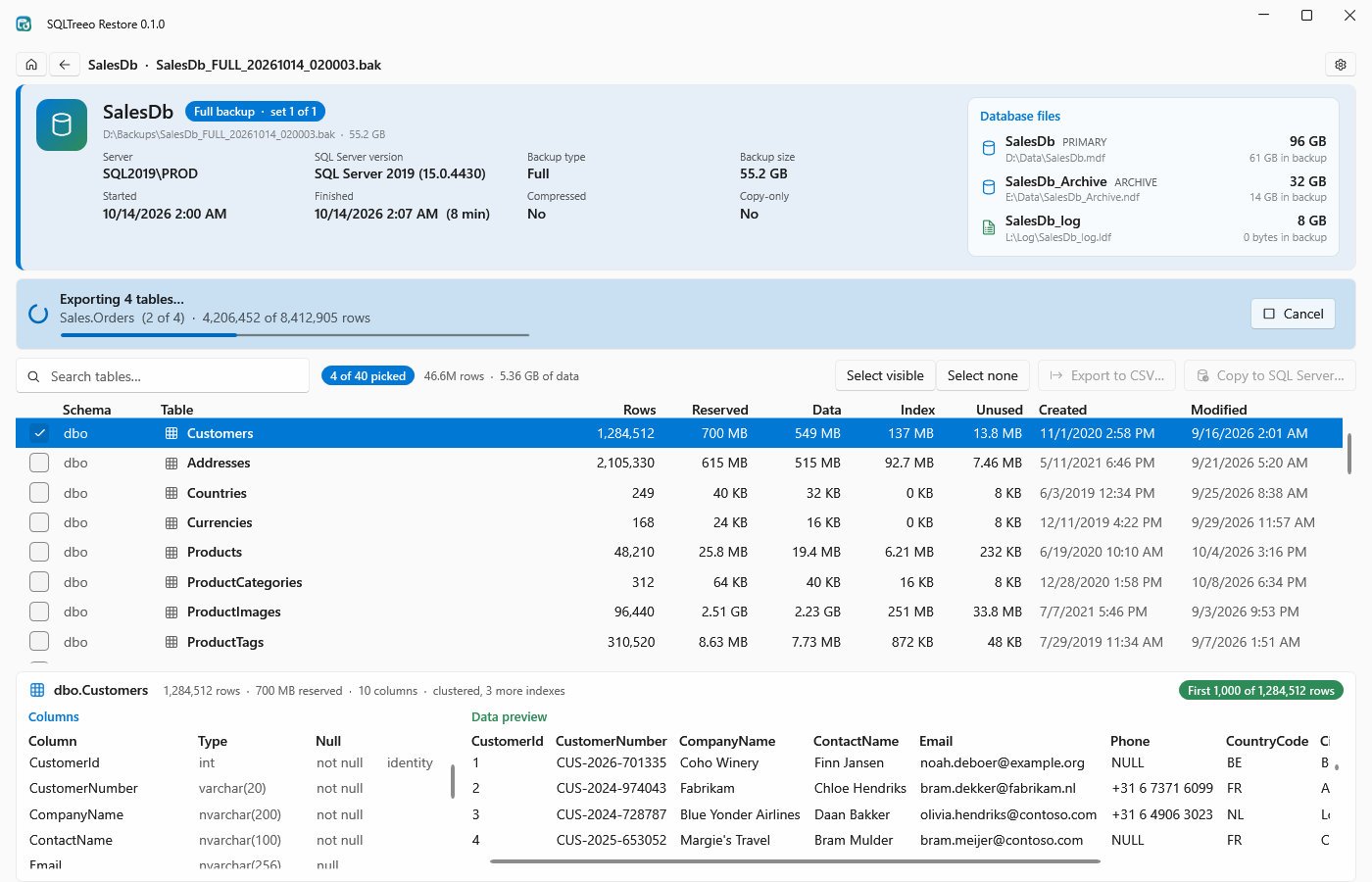
Four picked tables being exported to CSV, with the progress of the table that is being read

Export tables to CSV

One UTF-8 file per table that opens in Excel, with dates, times and GUIDs written the way SQL Server Management Studio shows them. A table that cannot be read is named with the reason, and the others are still exported.

A file gets its real name only when it is complete, so a cancelled export leaves no cut-off file. Files that are in the folder already are replaced only after you say so.

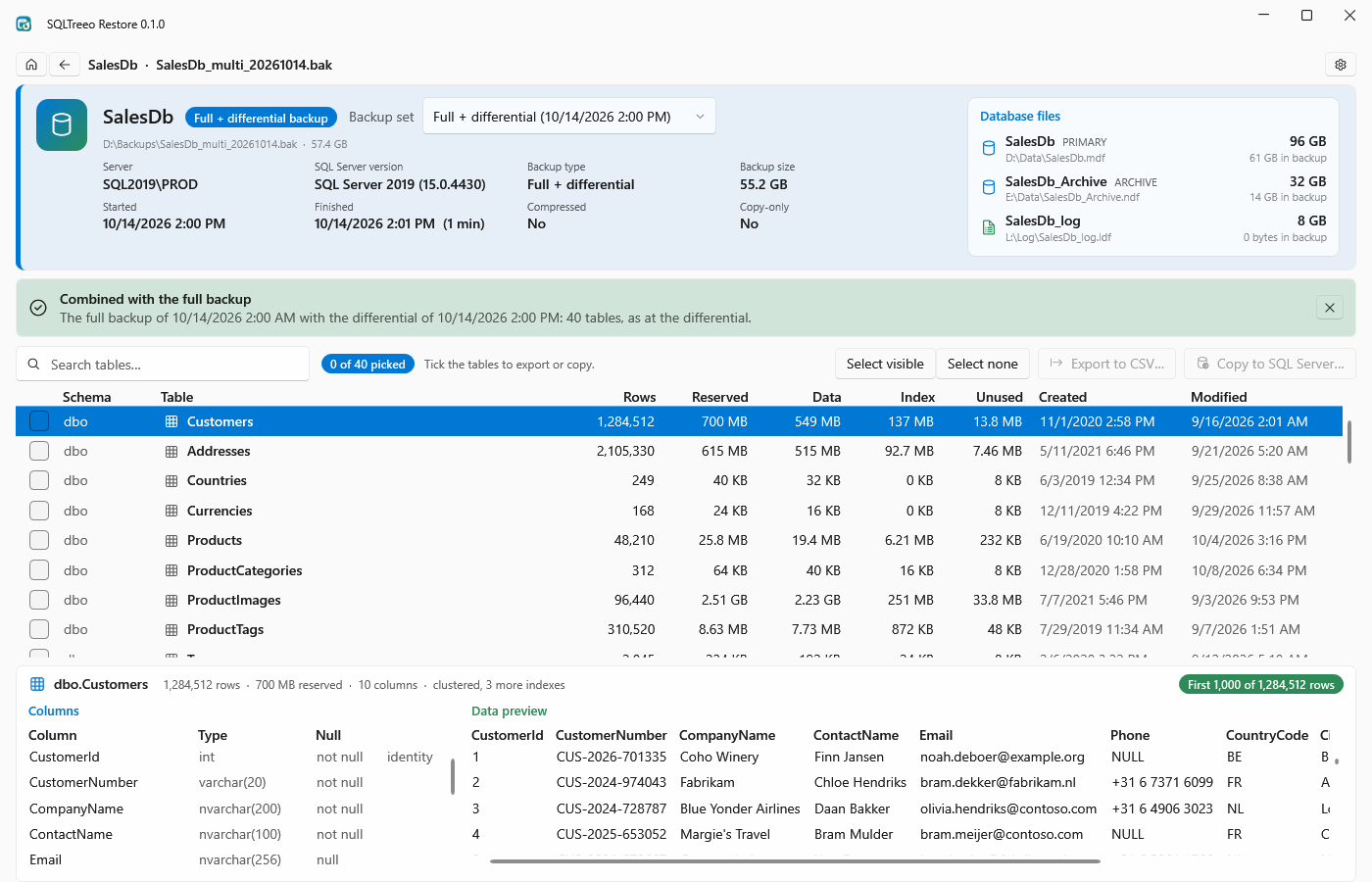
A differential backup combined with its full backup: the message says 40 tables, as at the differential

Differential backups, as they were

On a differential backup, Combine with full backup… finds the full backup it was made on, in the same file, in the same folder or in a file you choose. The tables and rows are then shown as they were at the differential.

Picking the wrong full backup is refused, with the reason.

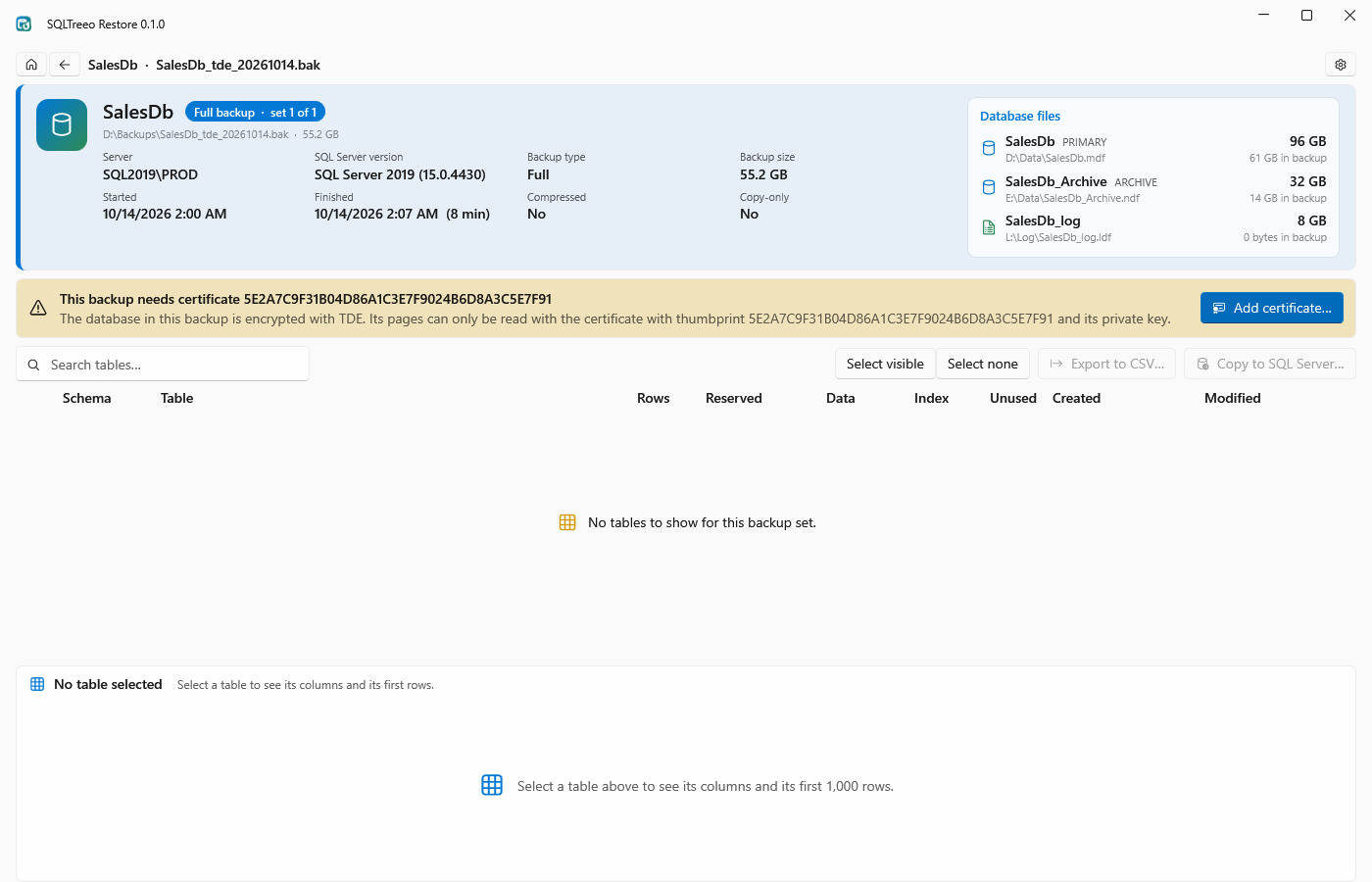
A TDE encrypted backup that names the certificate it needs, with an Add certificate button

Encrypted backups, with your certificate

Backups made WITH ENCRYPTION (AES) and backups of databases encrypted with TDE open with the certificate and its private key file (.cer and .pvk, as exported with BACKUP CERTIFICATE) and its password.

A backup that needs a certificate names it and offers Add certificate… right in the warning. The password is stored encrypted for your Windows account.

The backup file is only read. Nothing in it is changed, nothing is restored over an existing database, and no SQL Server is needed to look inside. Backup files, database contents, certificates and exported data are never sent to SQLTreeo: backups are read on your computer only.
Kinds of backups

What it can open

Backups from SQL Server 2019, 2022 and 2025 have been tested.

Compressed

Backups made WITH COMPRESSION open like uncompressed ones.

Encrypted

AES backups and TDE databases, compressed or not, with the certificate. TRIPLE_DES_3KEY is not supported.

Striped

One backup written to several files: open any of them and all files of the backup are read from the same folder. A missing file is named.

Differential and log

A differential is combined with its full backup. Log backups (.trn) open and show what is in them.

Several backup sets

A file with full, differential and log backups appended to it lists every set; full sets are readable.

Cut-off files

A file from an interrupted copy shows what is in it, with a warning that it is incomplete. A file that is not a backup gets a plain message.

Restore only what you need

Copy tables into a database

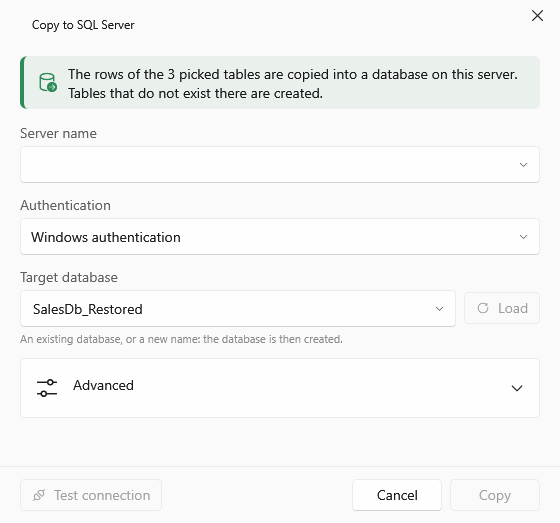
Pick tables and choose Copy to SQL Server…: they are copied into a database on a server of your choice, created if it does not exist.

Tables are created for you

A table that does not exist yet gets the same columns, types and collations, its primary key, unique constraints and clustered index, computed and sparse columns. Other indexes, foreign keys, check constraints and triggers are not created.

Existing tables

You are asked once: add the rows, replace the rows, or cancel. A table whose columns do not fit is left as it is, with the reason, and the other tables are still copied.

All or nothing, per table

Each table is copied completely or not at all. When a table fails or you cancel, it is left exactly as it was.

Exact values

All common data types, values stored outside the row such as varchar(max) and xml, and sql_variant values with their own type, precision and collation.

No missing rows in silence

When a table gives fewer rows than its row count, for example from a differential on its own or a striped backup with a file missing, the preview says so and an export or copy asks first.

Compression and columnstore

Tables with ROW or PAGE compression, sparse columns and clustered columnstore indexes are read like any other table.

The Copy to SQL Server dialog with server name, authentication and target database

Getting started with SQLTreeo Restore

Good to know

Where it stands

Windows desktop application

Windows 10 or 11, 64-bit, no .NET installation needed. The installer is per user, needs no administrator rights and updates itself; a portable zip runs without installing. Same look and handling as SQLTreeo Compare and SQLTreeo Job Timeline.

What it cannot read yet

Memory-optimized tables, and a column set over a sql_variant column, are listed with their sizes but marked as not readable yet, with the reason. Differential and log backups on their own show what they hold, not a full database.

Free to look, a key for every row

Opening backups and looking at them is free and has no time limit. There is no trial. Without a license key, Export to CSV and Copy to SQL Server write the first 1,000 rows of each table, marked as an unlicensed preview in the file or table name. A license key exports and copies every row. How license keys work.

Pricing plan

Free to look, a license key for every row

Free to look

Free
no trial, no time limit
  • Open any backup and see its sets, files, tables, columns and rows
  • Export to CSV and copy to SQL Server write the first 1,000 rows of each table
  • A license key exports and copies every row
Download

A license key is for one person, on up to three computers, and exports and copies every row of every table. To buy one, write to servicedesk@sqltreeo.com. How license keys work.

Ready to look inside a backup?

Download SQLTreeo Restore, open a .bak file and see what is in it. Looking is free; a license key is only needed to export or copy more than the first 1,000 rows of a table.

By installing SQLTreeo Restore you accept the end-user license agreement.