DBAs
You look after production servers.
See what every Agent job on every server does, look inside a backup before you restore it, and compare the settings of two instances.


SQLTreeo makes small, focused Windows tools for the people who run SQL Server and the teams around them. Tell us what you do, and we point you to the tool that does it.
Since 1998 · Free to try · No agents on your servers
Thank you for your purchase. Your license keys are on their way to the e-mail address you used at checkout, one for each tool. Not there within an hour? Check your spam folder, or write to servicedesk@sqltreeo.com.
Pick any 3 of our 5 tools. One checkout, one license of each, and 30% off the lot. No code to type.
Choose 3 tools.
Buy these 3Ends November 30, 2026Every product is built by DBAs, for DBAs and developers. Find the line that sounds like your week.
You look after production servers.
See what every Agent job on every server does, look inside a backup before you restore it, and compare the settings of two instances.
You ship database changes.
Compare two databases, get the deployment script, step through a stored procedure to see where it goes wrong, and let your pipeline stop a build when the schema drifts.
SQLTreeo Compare · SQLTreeo T-SQL Debugger · Virtual Folders for SSMS
You work across many servers and environments.
Group servers and jobs by environment, share folders in SSMS with the whole team, and use the same tools everywhere.
Five jobs that come back in every SQL Server environment, and the tool that does each one.
Anyone who lives in SQL Server Management Studio
Fifty databases in one long list, a thousand tables, two hundred Agent jobs. Group them in your own folders.
Free 30-day trialIn the Microsoft Store
Developers and DBAs who move changes between environments
A hotfix went straight to production, or a release did not reach every environment. Compare schemas, data and server settings, and get the script.
Free 30-day trialIn the Microsoft Store
DBAs with more than a few servers
Backups, index maintenance and the nightly load end up in the same half hour. See which jobs overlap, which run long and what failed.
Free 30-day trialIn the Microsoft Store
DBAs and anyone asked to bring data back
You need one table from last night, not a restore of the whole database. Open the .bak file, look inside, take only what you need.
Free to look at, no trialIn the Microsoft Store
Developers and DBAs who maintain stored procedures, on SQL Server and Azure SQL
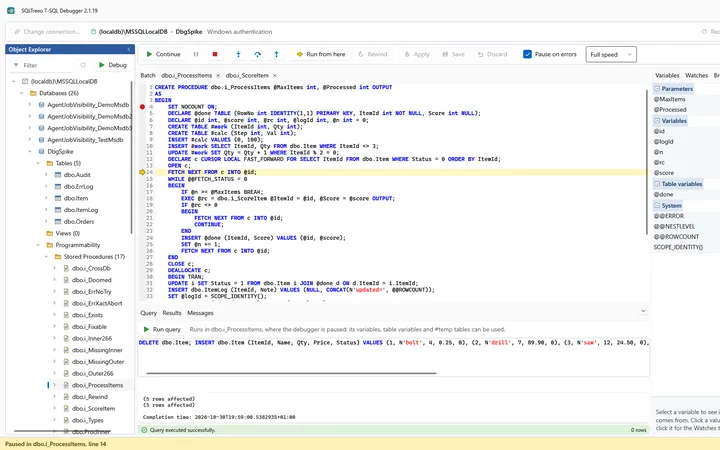
A procedure of three hundred lines calls two others and returns the wrong number. Step through it, watch the variables change, and let it pause on the error instead of reading the code.
Free 30-day trialIn the Microsoft Store
Choosing a SQL Server compare tool? See how SQLTreeo Compare compares with Redgate, dbForge, SQL Delta and ApexSQL.
One example of a normal morning.
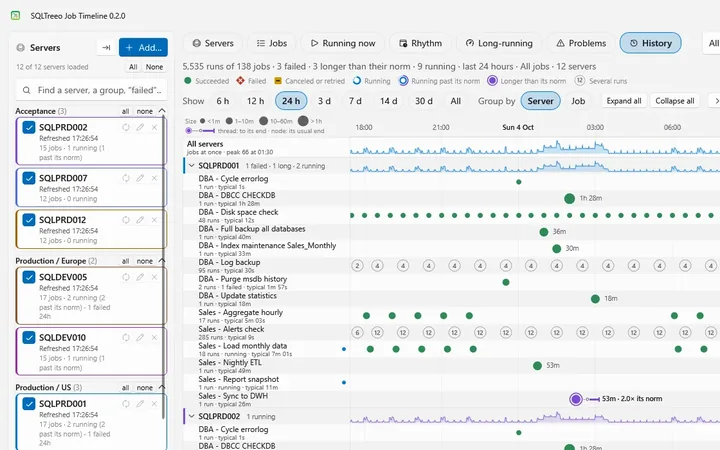
The Problems view of Job Timeline shows the failing step and its message, across all your servers.
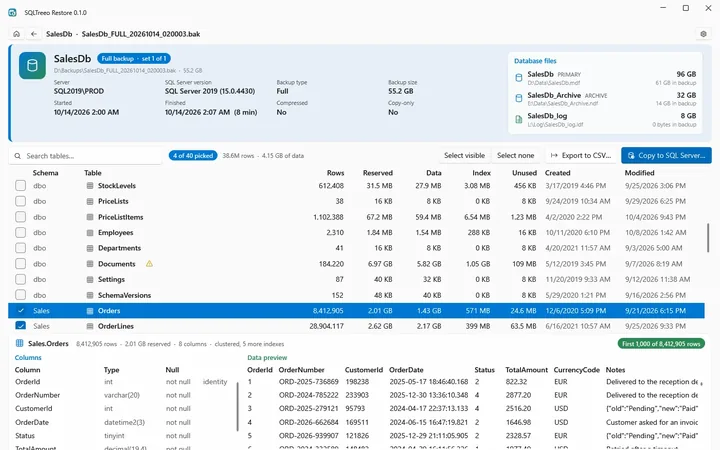
SQLTreeo Job TimelineRestore reads the backup file and copies just the table you need into a scratch database.
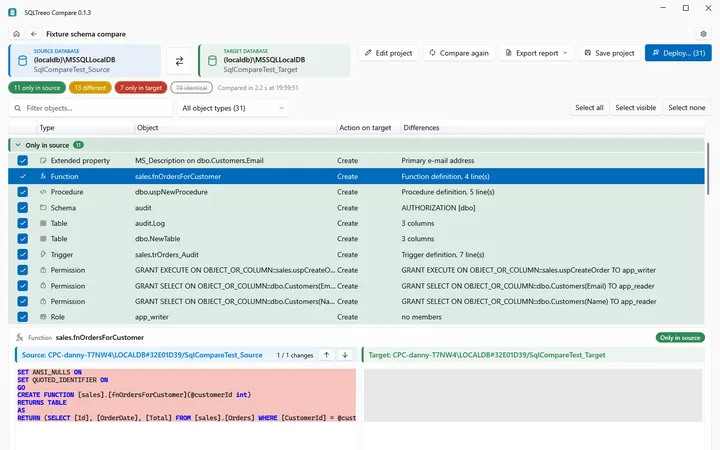
SQLTreeo RestoreCompare sets that table against production, row by row, and shows the differences.
SQLTreeo CompareVirtual Folders for SSMS, SQLTreeo Compare, SQLTreeo Job Timeline, SQLTreeo Restore and SQLTreeo T-SQL Debugger are listed in the Microsoft Store. Install them there with one click, or download the same installer from this website.

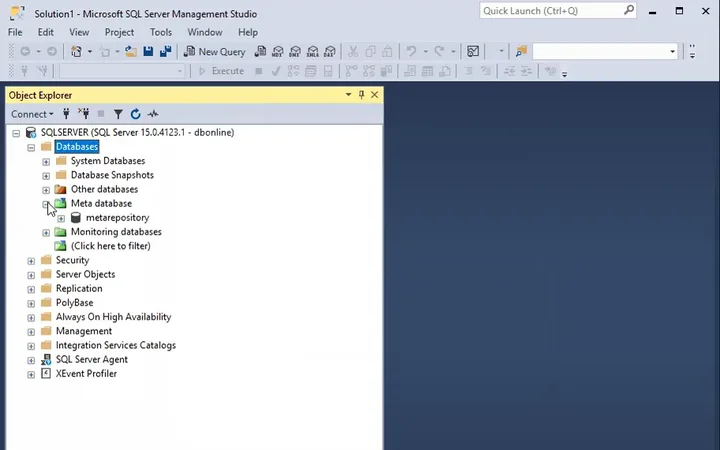
Organize the Object Explorer in SQL Server Management Studio with your own folders.

Compare SQL Server schemas, server configuration and data, also across all your environments at once. Generate the deployment script.

See which SQL Server Agent jobs overlap, which run longer than normal and what failed, across all your servers.

Open a SQL Server backup without a SQL Server, see what is inside and restore only the tables you need.

Step through SQL Server stored procedures and functions, with breakpoints, watches and the variables in view.
Our tools read what they need and write only where you tell them to. No hidden tables, no background agents.
Clear licenses per named user, all updates during the term. No inbox surprises, just emails you actually need.
SQLTreeo has supported and monitored production SQL Server environments since 1998. That experience goes into every product. SQLTreeo is a brand of DatabaseOnline.





















Based on my experience, SQLTreeo is very passionate about satisfying their customer’s needs. Always great output, solid solutions and quick responds by SQLTreeo when needed.

Optimizing and maintaining our databases was a daunting task for us. We did not have the proper knowledge and were unable to provide 24/7 support for our customers. SQLTreeo was able to reduce our processing time by 50% and is proactively supporting (monitoring) our systems so there is little to no business impact. Thanks to SQLTreeo we are in control of our Microsoft SQL servers.

SQLTreeo is our virtual teammate that never sleeps and continuously monitors the performance of our SQL production environment. They provide us with tailor-made SQL solutions that meet our exact demands.

Our production MS SQL standard edition databases with billions of records became too large to handle which resulted in performance degradation and long DR times. In SQLTreeo we’ve found a partner able to find a cost effective solution to keep our databases small in an automated and cost effective way. We will surely make use of the expertise of SQLTreeo for our future projects.

SQLTreeo virtual folders fills in the missing gap that SSMS lacks. Makes database development a breeze now.
I have an 800 GB SQL Server database and needed to roll back a single field in a single table. Downloading and restoring the backup, then extracting the data would have taken hours. SQLTreeo Restore did it in minutes. I used the CSV export and it gave me exactly what I wanted.

SQLTreeo is the tool brand of DatabaseOnline, the SQL Server consultancy in Roosendaal that has supported and monitored production environments since 1998. DatabaseOnline tunes, migrates, secures and monitors SQL Server environments, with monitoring around the clock.
Need a hand beyond the tools? Talk to the people who build them.
No. Every tool runs on your own computer, and no agents or services are installed on your servers. Job Timeline only reads (SELECT statements), Restore only reads the backup file, Compare changes a database only when you run the deployment script it makes, and T-SQL Debugger runs the stored procedure you choose, statement by statement over your own connection, so use a test database when you are not sure what a procedure changes.
It differs per tool, and each product page lists it. Virtual Folders works with SSMS 20, 21 and 22. Compare works with SQL Server 2016 and later, Azure SQL Database and Azure SQL Managed Instance. Restore has been tested with backups of SQL Server 2019, 2022 and 2025. T-SQL Debugger connects to SQL Server, wherever it runs, and to Azure SQL Database, and has been tested on SQL Server 2025 and on Azure SQL Database.
Yes. Virtual Folders, Compare, Job Timeline and T-SQL Debugger start with a free 30-day trial. Restore has no trial: opening and looking at backups is free, and without a license key it exports and copies the first 1,000 rows of each table.
Per named user and per term, with all updates during the term. A key is for one person, who can use it on up to three computers. The price of each license is on its product page and is the price you pay at checkout.
SQLTreeo is a brand of DatabaseOnline in Roosendaal, the Netherlands, the SQL Server consultancy behind it, which has supported and monitored production SQL Server environments since 1998. Support goes through support.sqltreeo.com or servicedesk@sqltreeo.com.
Pick the job from the list above and download that tool. Looking around is free, and the paid features are there when you need them.