

Job Details and Job Overview
See which SQL Agent jobs overlap, how long they really run and which need attention, with a suggested new start time, in a window or a report.
Virtual Folders shows which SQL Agent jobs overlap, how long they really run and which need attention, with two items on the right-click menu of the SQL Server Agent:
- Job details: right-click a job under SQL Server Agent → Jobs.
- Job overview: right-click the SQL Server Agent node.
Both read the msdb database of the server you are connected to, so you need permission to read it. Run times come from the job history that Agent keeps.
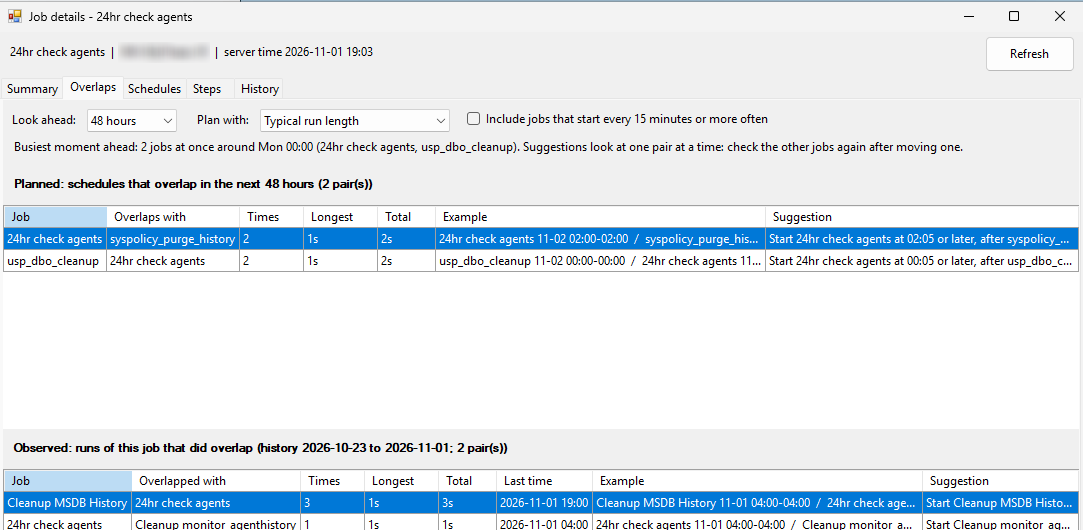
Overlaps
Two lists show jobs that run at the same time:
- Planned overlaps, from the schedules for the next 24 hours, 48 hours or 7 days, with each job as long as it normally runs (or as long as on a slow day).
- Observed overlaps, found in the history of what really ran.
Each pair shows how often the two overlap, the longest and the total overlap, an example, and a suggested new start time for one of the two jobs so they no longer run at the same time. Jobs that start every 15 minutes or more often are left out until you tick the box for them. A suggestion looks at one pair at a time, so check that the new time does not collide with a third job.
Job details
Besides the overlaps, the window for one job has its schedules in plain words, its steps, its run history with the failed step and the message, and its typical and slow run lengths.
Job overview
Besides the overlaps, the overview for the whole server lists the jobs that run now and how long they have been running compared to normal, the failures of the last 7 days, the run length per job, and the jobs that need attention: disabled jobs, jobs whose owner no longer exists as a login, enabled jobs without an enabled schedule, and scheduled jobs that never ran.
In a query window
Both menus also have an item in a new query window. It opens the same tabs as a text report in a query window connected to that server, written as -- comments so that it stays valid T-SQL. You can read it, edit it, save it or mail it. The overlap lists in the report use their default settings.
Switches
Job details and Job overview each have a switch on the Options page under SQL Server Agent, in case you do not want them on the menu. See The Options Page and its Switches.