

Details of Views, Procedures and Functions
Created and modified dates, parameters, view tables and calling SQL Agent jobs on the right-click menu.
Virtual Folders shows the details of a view, procedure or function on its right-click menu, so you do not need a query for them: right-click a view, stored procedure or function in Object Explorer. Under the Virtual Folders item the menu shows:
- Created and modified: when the object was created and last changed (
sys.objects). - Parameters (procedures and functions): name, type and OUTPUT where it applies. For a scalar function the return type is listed as returns int.
- Tables (views): the tables the view reads from, also through other views it uses, up to ten levels deep.
- Called by jobs: the SQL Agent jobs that have a T-SQL step with the object’s name in its text. A disabled job is marked (disabled). Only steps that run in this database, or that mention the database name, are counted.
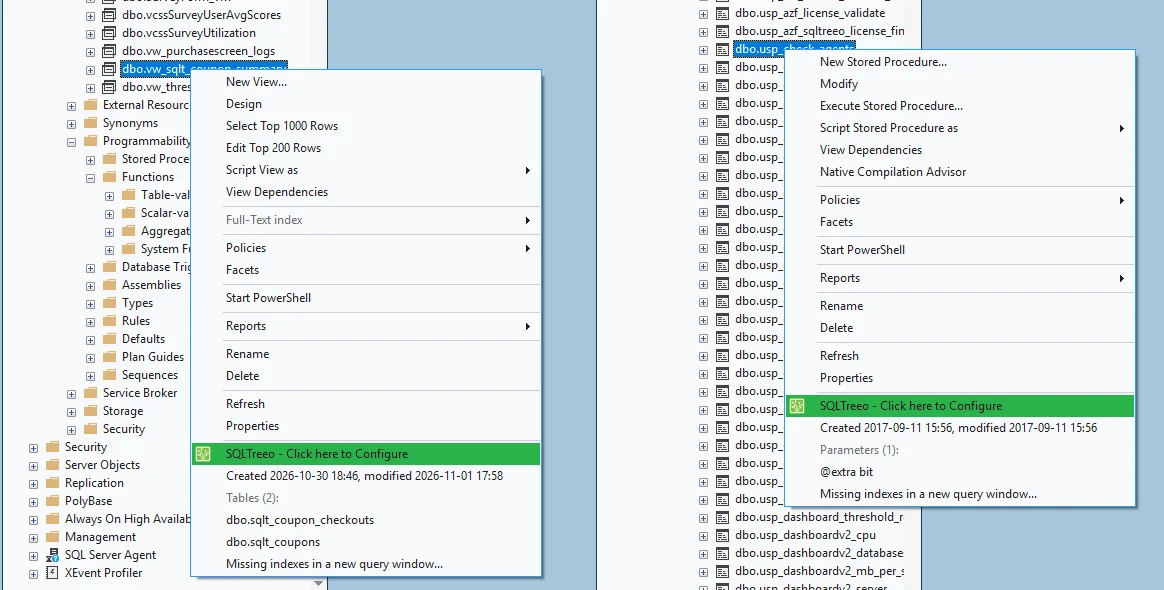
A part with nothing to show is left out, so an object that no job calls shows no job list. Lists show 25 lines at most, with a note for the rest.
The job search compares the name with the text of the job steps. It does not parse them, so a job that only mentions the name in a comment, or has a longer name that contains it, is listed too. It needs permission to read msdb; without it, or on Azure SQL Database, there is no job list.
Switches
Every part has its own switch on the Options page under Views, stored procedures and functions: created, modified and parameters, tables of a view, and jobs that call an object. A part that is switched off is not queried. If the menu opens slowly on your server, the job search is the one to try first, because it reads the job steps of the whole server.