

Role Members on the Right-Click Menu
See who is in a server role or a database role without opening its properties.
Virtual Folders shows who is in a role without opening its properties: right-click a server role (Security → Server Roles) or a database role (the database → Security → Roles → Database Roles) in Object Explorer, and under the Virtual Folders item the menu lists the members of the role.
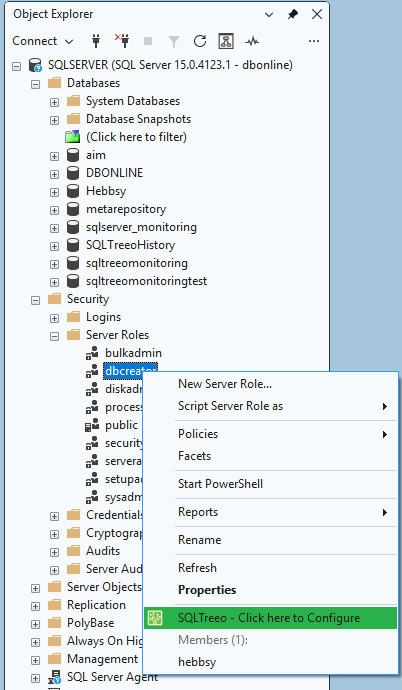
- The list has at most 25 members; if there are more, the menu says how many are not shown.
- A role that is itself a member is marked (role).
- Click a member to open its properties: a login for a server role, a user for a database role. The add-in finds the login or user in Object Explorer (it opens the Logins or Users folder if needed) and opens it the way a double-click does. A member that is a role is only listed.
- The public role has no list: every login and user is in it.
- A role without members shows No members.
The members come from sys.server_role_members (server roles, read in master) and sys.database_role_members (database roles, read in that database). You need permission to see them; without it, nothing is added to the menu.
Server roles and database roles each have their own switch on the Options page under Security: logins and roles. A role you switch off is not queried, so if the menu is slow or fails on your server you can turn it off without losing the other features.