
Compare table data between two SQL Server databases
Find the rows that differ between two SQL Server databases: missing rows, extra rows and changed values. With EXCEPT in T-SQL, or for all tables at once.
Reference data, settings tables and lookup lists are supposed to be the same in every environment. After a while they are not: a country was added in production, a setting was changed on test. A data comparison shows which rows exist on one side only and which rows have different values.
One table in T-SQL
For a single table on the same instance, EXCEPT returns the rows of the first query that are not in the second:
SELECT * FROM DevDb.dbo.Country
EXCEPT
SELECT * FROM TestDb.dbo.Country;
Run it a second time with the databases swapped to see the rows that only exist in the other database. The limits show quickly:
- One table per query, and two queries per table.
- A changed row shows up in both results. You have to find the column that changed yourself.
- Columns of type
xml,text,ntext,image,geographyandgeometrycannot be used withEXCEPT. - Databases on different servers need a linked server.
SQL Server also ships the tablediff command line utility with its replication components. It compares one table per run.
All tables with SQLTreeo Compare
- Choose Compare table data on the start page.
- Click the source and target tiles to set the two databases. They can be on different servers.
- Limit the comparison if you want to (see the options below) and press Compare.
Every table that exists in both databases is compared. For a table with differences you see the row counts on both sides, the number of rows only in the source, only in the target and different, and the differing values side by side.
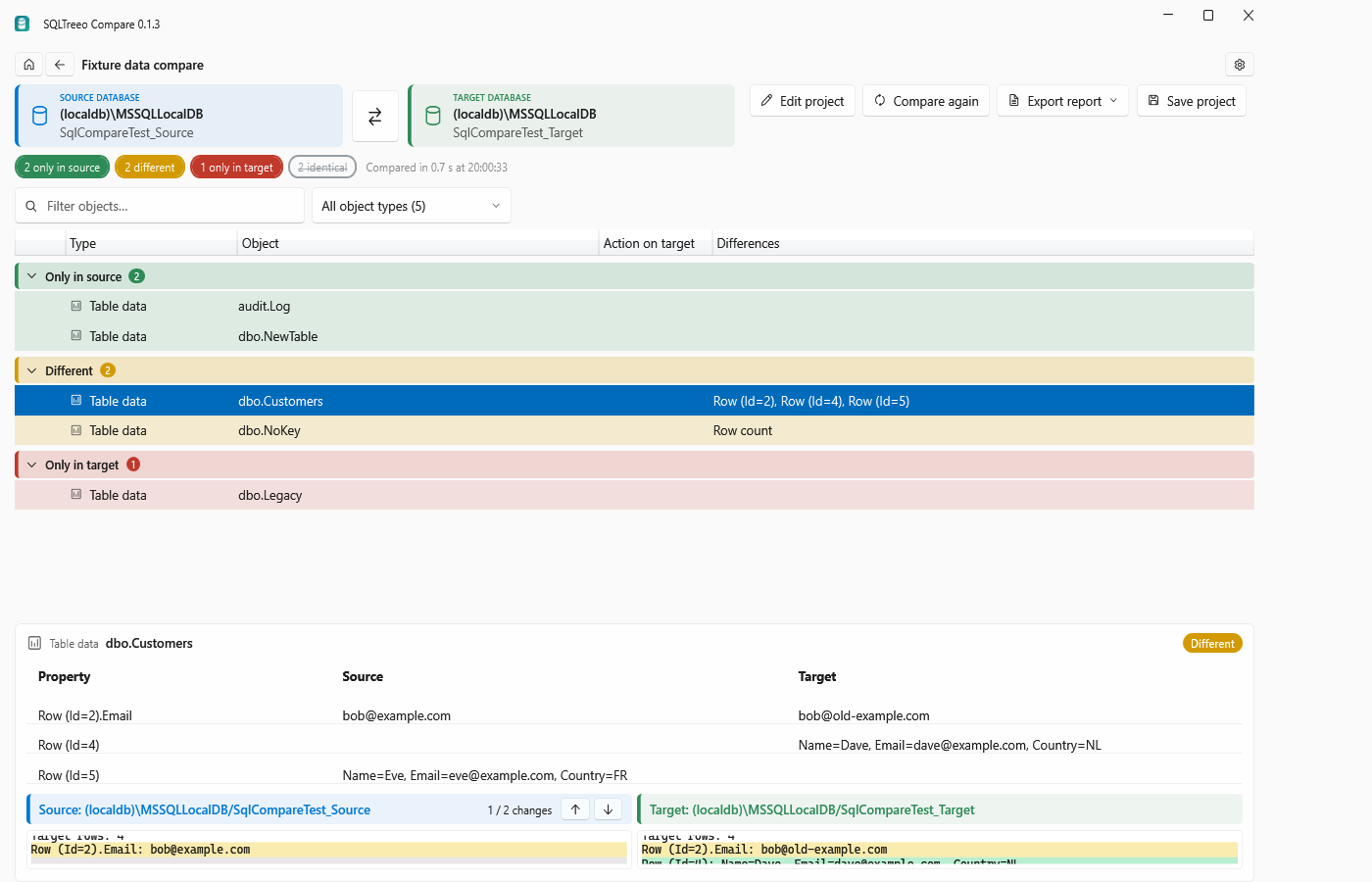
Tables that exist in one database only are listed as Only in source or Only in target.
Options
| Option | What it does |
|---|---|
| Include tables, Exclude tables | Table names as schema.name or name, with * as a wildcard, for example ref.* |
| Ignore columns | Column names that should not count, for example Modified* |
| Maximum row differences reported per table | 100 by default. The totals are always complete; this only limits how many rows are listed |
| Compare row counts only | Counts the rows and skips the row-by-row comparison |
| Key columns for tables without a primary key | One line per table: schema.table = col1, col2 |
How rows are matched
Rows are matched on a key, in this order:
- The key columns you entered for the table.
- The primary key.
- The smallest unique index that is not filtered or disabled.
The key columns must exist in both tables. A table without any usable key is compared on row counts only. The result names those tables in a warning, so you can give them a key.
Not compared: computed columns, rowversion (timestamp) columns, the columns you ignore, and columns that exist on one side only. For a table with differences they are listed under Columns not compared.
Values are compared exactly. Amsterdam and amsterdam are different, whatever the collation of the column, and so are values that differ only in trailing spaces. NULL equals NULL, and numbers are compared by value.
From the command line
Compare the reference tables and ignore the audit columns:
sqlcompare data --source "Server=dev;Database=Shop;Integrated Security=true" --target "Server=test;Database=Shop;Integrated Security=true" --table "ref.*,dbo.Country" --ignore-column "Modified*,Created*"Give a key for a table that has no primary key:
sqlcompare data --source "..." --target "..." --table "dbo.Settings" --key "dbo.Settings=Name"--counts-only compares row counts, --max-rows 500 lists more row differences per table, and --format html --output data.html writes a report. The exit code is 0 when the data is the same and 1 when it differs.
Good to know
- The comparison only reads. It runs
SELECTstatements in key order on both sides and writes nothing to either database. - Whole tables are read. For very large tables, limit the comparison to the tables you need, or start with row counts only.
- SQLTreeo Compare reports data differences. It does not generate a script that synchronises the data.
- Comparing and reading the differences are free. Copying them, exporting a report and the command line work during the 30-day trial or with a license, see Trial and licensing.
- To compare the table definitions instead of the rows, see How to compare two SQL Server databases.