

Compare Development, Test, Acceptance and Production in one run
Check whether Development, Test and Acceptance still match Production: find schema drift across all SQL Server environments of a DTAP (OTAP) street in one comparison.
A DTAP street (OTAP in Dutch) only works when the environments stay in step. In practice they drift: a hotfix goes straight to Production and never comes back to Development, an import test leaves a table behind in Test, a permission is forgotten in Acceptance. The next release then behaves differently in every environment.
The question before every release is simple: is each environment still the same as Production, and if not, what is different where? This article shows how to answer it by hand and with SQLTreeo Compare, which compares one baseline with all your environments in a single run.
By hand
Run this query in the database of every environment. It lists every table, view, procedure, function and trigger with a fingerprint of its definition:
SELECT s.name + '.' + o.name AS object_name,
       o.type_desc,
       CONVERT(char(64), HASHBYTES('SHA2_256',
           COALESCE(OBJECT_DEFINITION(o.object_id),
                    (SELECT STRING_AGG(c.name + ' ' + TYPE_NAME(c.user_type_id) + '(' + CAST(c.max_length AS varchar(10)) + ')', ',')
                            WITHIN GROUP (ORDER BY c.column_id)
                     FROM sys.columns c WHERE c.object_id = o.object_id))), 2) AS fingerprint
FROM sys.objects o
JOIN sys.schemas s ON s.schema_id = o.schema_id
WHERE o.is_ms_shipped = 0 AND o.type IN ('U', 'V', 'P', 'FN', 'IF', 'TF', 'TR')
ORDER BY object_name;
Save each result, for example as a CSV file per environment, and compare them in a spreadsheet: a name that is missing in a column, or a fingerprint that differs from Production, is drift.
It is a quick first check, but it misses a lot. Indexes, constraints, defaults, users, roles and permissions are not in it, a single changed space in a procedure changes the fingerprint, and you still have to find out what differs in every object that does. With four environments you also repeat it four times, every time.
With SQLTreeo Compare
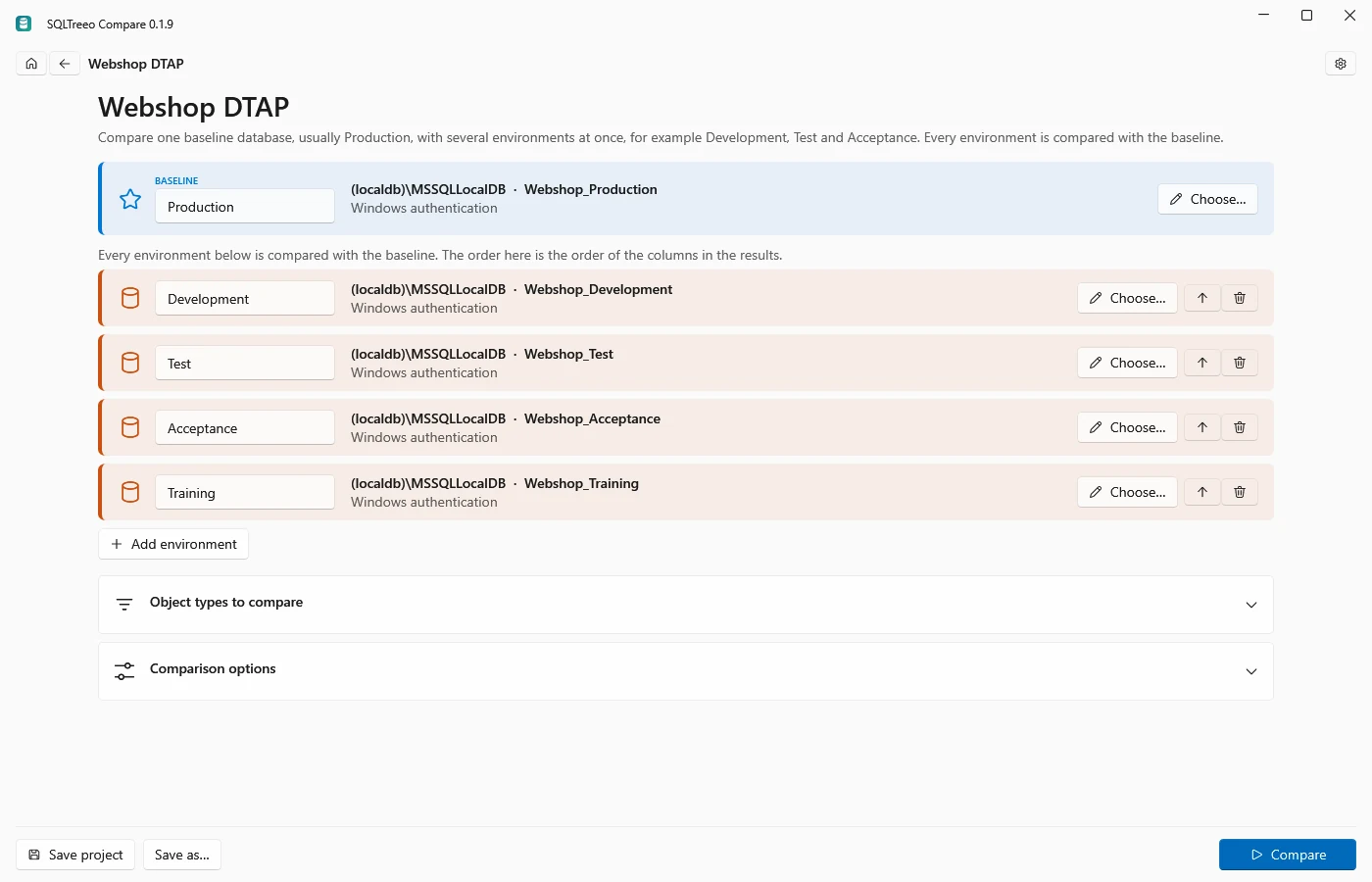
- On the start page, choose Compare several environments at once and click Database schemas.
- Give the baseline a name, usually Production, and click Choose… to pick its server and database.
- The project starts with Development, Test and Acceptance. Rename them, remove the ones you do not have, or click Add environment for more, and pick the database of each one. The order here is the order of the columns in the results.
- Press Compare.
Every environment is compared with the baseline. The results start with a tile per environment: green when it matches the baseline, amber when something differs, red when it could not be reached. Below the tiles, the matrix lists every object that differs somewhere, with its state in every environment:
| Mark | Meaning |
|---|---|
| = | The same as in the baseline |
| ≠ different | The environment has the object, with another definition |
| missing | The baseline has the object, the environment does not |
| extra | Only the environment has the object |
| ? | The environment could not be compared |
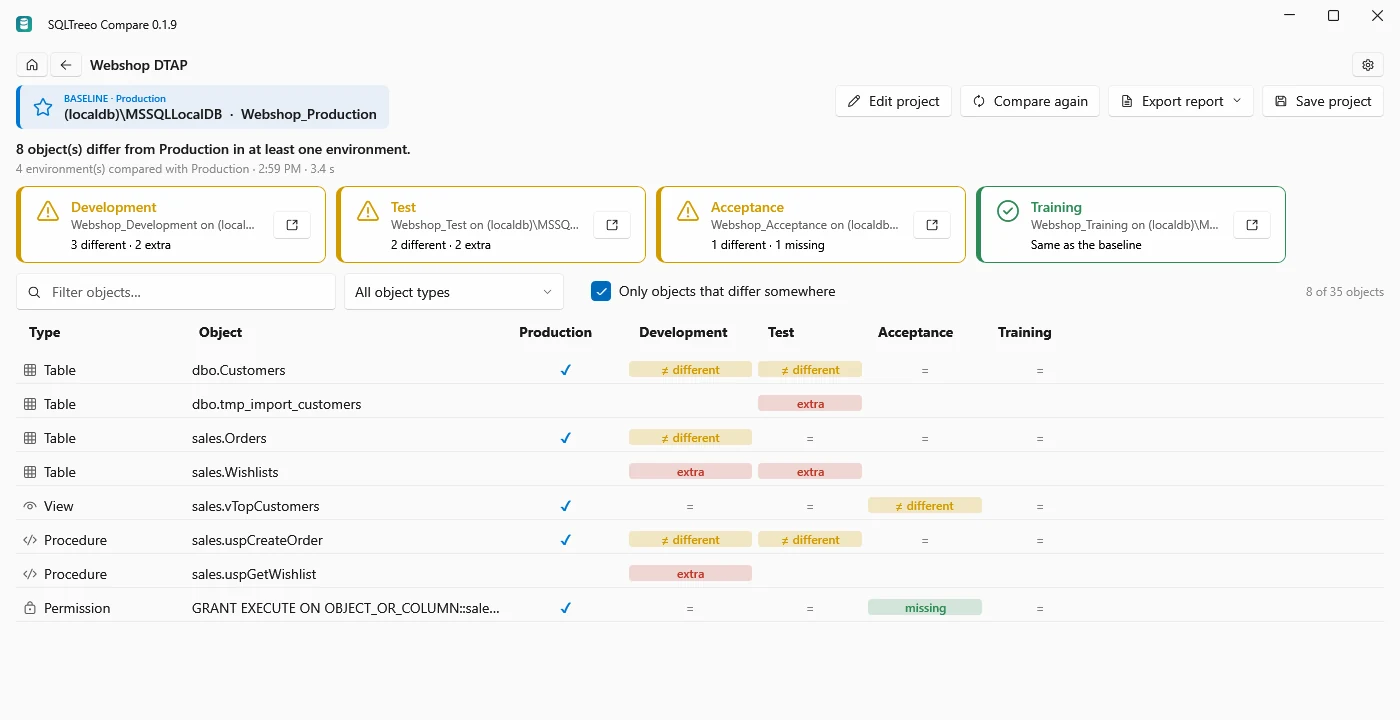
In this example Development and Test have the release that is being built: a new table, a new column in dbo.Customers and a changed procedure. Development also has a new procedure and misses an index that was added to Production as a hotfix, Test has a table left behind by an import, and Acceptance has a changed view and is missing a permission. Training matches Production.
- Click a tile to see only what differs in that environment. Click it again, or Show all, to see everything.
- Clear Only objects that differ somewhere to list every object, also the ones that are the same everywhere.
- Click a cell to open the comparison of the baseline with that environment on the usual results page, with that object selected: its property differences, the scripts side by side and the deployment script. Deploy there is aimed at that one environment.
- Export report saves the matrix as HTML, JSON or text.
- Save project keeps the baseline and every environment, so the next check is one click.
An environment that cannot be reached, for example because a login fails, does not stop the comparison: its tile shows the reason and its column shows ?.
In a pipeline
The command line does the same comparison without the UI. Give the baseline with -b and every environment as Name=connection string with -e:
sqlcompare environments -b "Server=prod;Database=Shop;Integrated Security=true" -e "Development=Server=dev;Database=Shop;Integrated Security=true" -e "Test=Server=test;Database=Shop;Integrated Security=true" -e "Acceptance=Server=acc;Database=Shop;Integrated Security=true" --format html --output drift.html| Exit code | Meaning |
|---|---|
| 0 | Every environment matches the baseline |
| 1 | At least one environment differs |
| 2 | An environment could not be read, or another error; the report is still written |
The schema filters of sqlcompare schema work here too, for example --exclude Users,Roles,Permissions when security differs per environment on purpose. See Detect schema drift in a CI pipeline for running it from GitHub Actions or Azure DevOps.
Good to know
- Comparing several environments needs SQLTreeo Compare 0.1.9 or later.
- Up to four databases are read at the same time; there is no limit on the number of environments.
- Table data is compared between two databases only; see Compare table data.
- For server settings across several instances, see Find configuration drift across all your SQL Servers.