
Find overlapping SQL Server Agent jobs
Find SQL Server Agent jobs that run at the same time: a T-SQL query on msdb for one server, and the Rhythm view of SQLTreeo Job Timeline for all servers.
Backups, index maintenance, the nightly load and a few reports are each scheduled on their own, by different people at different times. Nobody sees them together, until the night they all start within the same half hour and every one of them takes twice as long. This article shows how to find jobs that overlap, first with a query on msdb and then for all your servers at once.
What counts as an overlap
Two runs overlap when one starts before the other has ended. A schedule only says when a job starts, so the reliable way is to compare real runs: start and end of every run in the history. Whether an overlap is a problem depends on the jobs. A log backup that overlaps a statistics update is usually harmless. A full backup, an index rebuild and a data load that overlap compete for the same disks, memory and locks.
Find overlaps with T-SQL on one server
SQL Server Agent keeps the history of its runs in msdb.dbo.sysjobhistory. The row with step_id = 0 is the outcome of a whole run. The date and time are stored as integers, and the duration is packed as HHMMSS, so they have to be decoded first. msdb.dbo.agent_datetime turns the integers into a datetime.
WITH runs AS (
    SELECT j.job_id,
           j.name AS job_name,
           msdb.dbo.agent_datetime(h.run_date, h.run_time) AS start_time,
           DATEADD(SECOND,
                   (h.run_duration / 10000) * 3600
                 + (h.run_duration / 100 % 100) * 60
                 + (h.run_duration % 100),
                   msdb.dbo.agent_datetime(h.run_date, h.run_time)) AS end_time
    FROM msdb.dbo.sysjobhistory AS h
    JOIN msdb.dbo.sysjobs AS j ON j.job_id = h.job_id
    WHERE h.step_id = 0   -- the outcome of a run, not its steps
      AND h.run_date >= CONVERT(int, CONVERT(char(8), DATEADD(DAY, -7, GETDATE()), 112))
)
SELECT a.job_name AS job_a,
       b.job_name AS job_b,
       a.start_time AS a_start, a.end_time AS a_end,
       b.start_time AS b_start, b.end_time AS b_end,
       DATEDIFF(SECOND,
                IIF(a.start_time > b.start_time, a.start_time, b.start_time),
                IIF(a.end_time   < b.end_time,   a.end_time,   b.end_time)) AS overlap_seconds
FROM runs AS a
JOIN runs AS b
  ON a.job_id < b.job_id          -- every pair once
 AND a.start_time < b.end_time
 AND b.start_time < a.end_time
ORDER BY overlap_seconds DESC;
This lists every pair of runs that overlapped in the last 7 days, longest overlap first. The times are in the time zone of the server.
Three things limit what the query can tell you:
- The history is short. By default
sysjobhistoryholds 1,000 rows for the whole instance and 100 rows per job, and every step of a run takes a row. A busy instance keeps a few days, sometimes less than the 7 days in the query. See Job history, baselines and long runs. - Frequent jobs fill the result. A job that runs every minute overlaps with almost everything. Leave such jobs out with a condition on the job name.
- It looks backwards. The query shows what overlapped, not what is going to. The schedules are stored as numeric codes such as
freq_type,freq_intervalandfreq_subday_type, and projecting the coming days from them takes a lot of code.
See overlaps on all servers: the Rhythm view
The Rhythm view of SQLTreeo Job Timeline answers the same question without a query, for every server in the workspace.
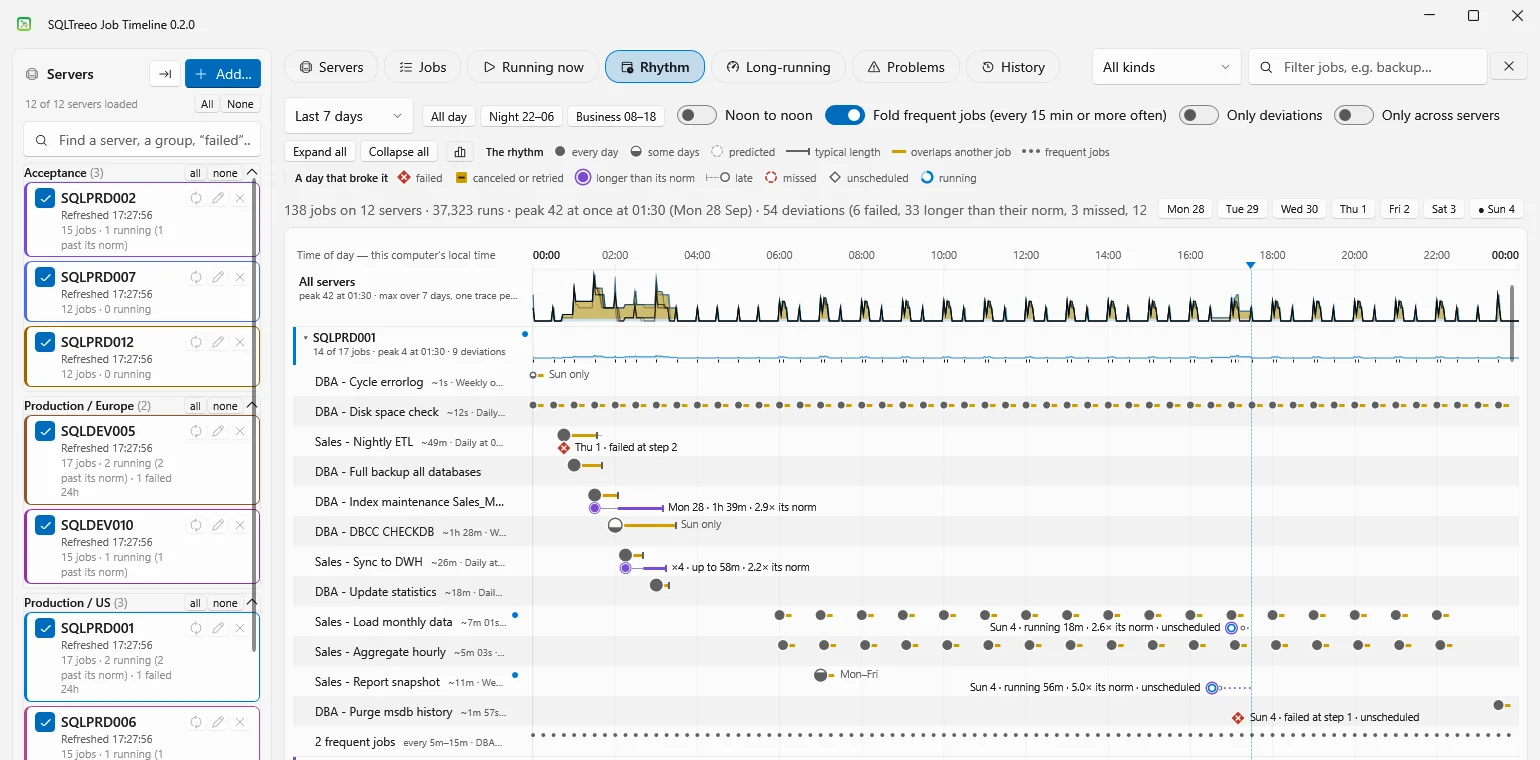
- The days of the chosen window are folded onto one 24-hour axis. The window is the last 24 hours, 7, 14 or 30 days, or the next 7 days, so you can look ahead at the schedules as well as back at what ran.
- The band at the top shows how many jobs run at once. The peaks are the busy periods.
- Per job one bead stands where the job starts every day. Where a job overlaps another job, its line turns amber.
- The panel on the right lists the busy periods and the pairs of jobs that overlap.
- The filter narrows the analysis. With
backuptyped, Rhythm shows which backups run at the same time.
In a workspace of more than 12 servers, Rhythm looks for overlaps within each server. Across hundreds of servers some job always runs, so every job would overlap every other. See Add many servers at once.
The history that Rhythm draws is not limited to what msdb still holds: the application keeps a local archive of the runs it has read, for 400 days. Nothing is written to your servers. The application only reads.
What to do about an overlap
Start with the overlaps that involve a heavy job, such as a full backup, an index rebuild, DBCC CHECKDB or a large load, and check whether the other job in the pair got slower during the overlap. The Long-running view shows that. Then either:
- Move one schedule to a quiet part of the day. The busy periods in Rhythm show where there is room.
- Chain the jobs. Let the first job start the second in a last job step with
EXEC msdb.dbo.sp_start_job N'Second job';, and remove the schedule of the second job. They then run one after the other, however long the first one takes.
Related
- Getting started for a tour of all views.
- Find SQL Server Agent jobs that run longer than usual.
- Permissions and what is read for the access the application needs on msdb.