
Find SQL Server Agent jobs that run longer than usual
Find SQL Server Agent jobs that take longer than usual: a T-SQL query on msdb, and the baseline rule SQLTreeo Job Timeline uses for every job.
A job that normally takes four minutes and now takes twenty is a warning, long before it fails. A job that takes an hour every night is fine at an hour. A fixed limit, such as “alert when a job runs longer than 60 minutes”, catches neither case well: it misses the first and bothers you with the second. The useful question is whether a run is long for that job.
Why a fixed threshold does not work
Jobs differ in size by orders of magnitude. One limit for all of them is either so low that the big jobs always trigger it or so high that the small jobs can slow down by a factor of ten without anyone noticing. The measure has to come from the job’s own history: what is normal for this job, and how far does it usually vary.
Compare the last run with the median, in T-SQL
The history of SQL Server Agent is in msdb.dbo.sysjobhistory. The row with step_id = 0 is the outcome of a run, and the duration is packed as HHMMSS. The query below takes the successful runs, calculates the median duration per job and lists the jobs whose latest successful run took more than one and a half times the median. It needs SQL Server 2012 or later, for PERCENTILE_CONT.
WITH runs AS (
    SELECT h.job_id,
           msdb.dbo.agent_datetime(h.run_date, h.run_time) AS start_time,
           (h.run_duration / 10000) * 3600
         + (h.run_duration / 100 % 100) * 60
         + (h.run_duration % 100) AS seconds
    FROM msdb.dbo.sysjobhistory AS h
    WHERE h.step_id = 0
      AND h.run_status = 1            -- succeeded: failed runs often stop early
),
baseline AS (
    SELECT DISTINCT job_id,
           PERCENTILE_CONT(0.5) WITHIN GROUP (ORDER BY seconds) OVER (PARTITION BY job_id) AS median_seconds,
           COUNT(*) OVER (PARTITION BY job_id) AS runs
    FROM runs
),
latest AS (
    SELECT job_id, start_time, seconds,
           ROW_NUMBER() OVER (PARTITION BY job_id ORDER BY start_time DESC) AS rn
    FROM runs
)
SELECT j.name AS job_name,
       l.start_time,
       l.seconds AS took_seconds,
       b.median_seconds,
       CAST(l.seconds / NULLIF(b.median_seconds, 0) AS decimal(9, 1)) AS times_median
FROM latest AS l
JOIN baseline AS b ON b.job_id = l.job_id
JOIN msdb.dbo.sysjobs AS j ON j.job_id = l.job_id
WHERE l.rn = 1
  AND b.runs >= 5                      -- too few runs: no norm yet
  AND l.seconds > b.median_seconds * 1.5
ORDER BY times_median DESC;
This is a start, with two weaknesses. Agent keeps little history, by default 1,000 rows for the whole instance and 100 per job, so the median of a weekly job rests on very few runs. And a factor of 1.5 is a guess: it is too tight for a job whose duration varies a lot from day to day, and too loose for a job that always takes the same time to the second.
The rule SQLTreeo Job Timeline uses
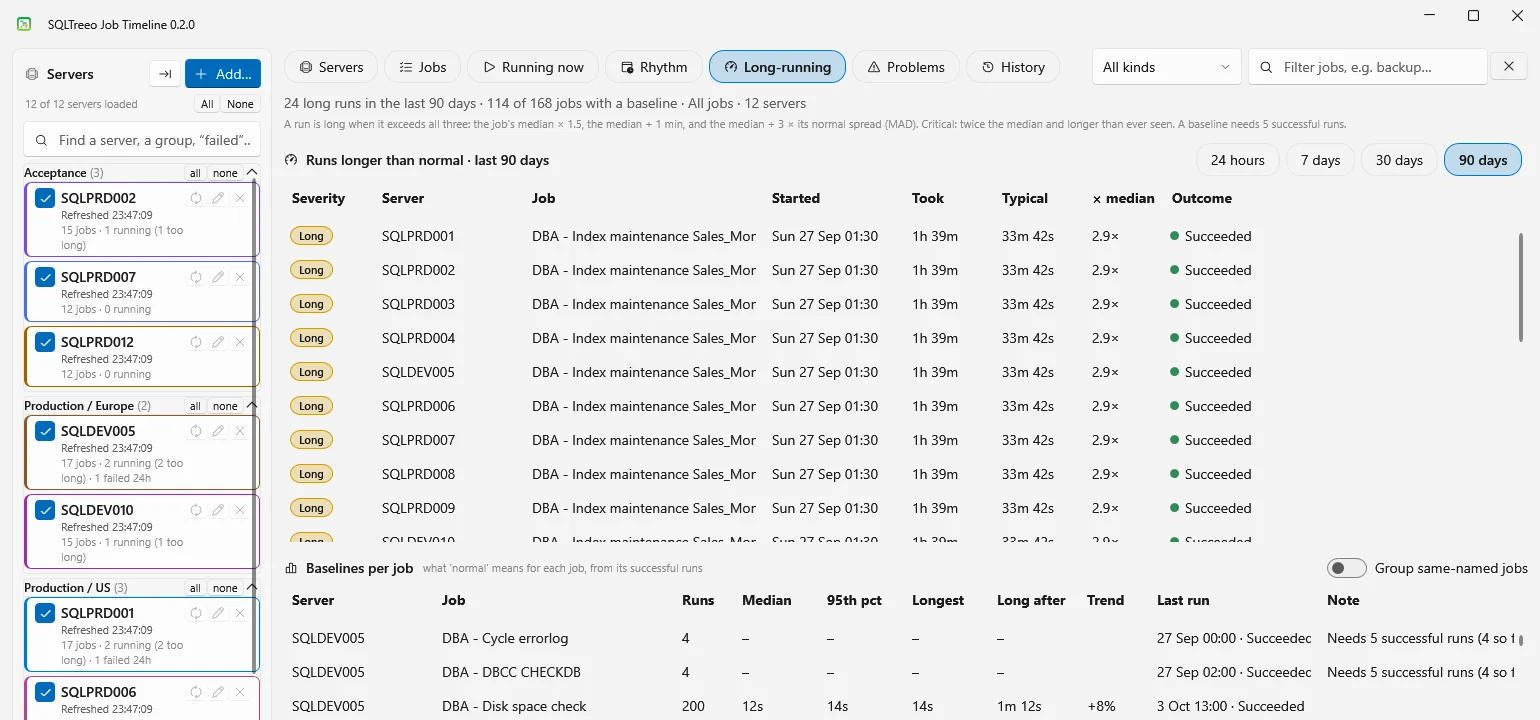
SQLTreeo Job Timeline measures every job against its own baseline: the durations of its most recent successful runs, 200 at most. A job has a baseline once it has 5 successful runs. A run is long when it exceeds all three of these:
- The median × 1.5, a margin in proportion to the job.
- The median + 1 minute, so that a job of four seconds that takes seven is not reported.
- The median + 3 × its normal spread. The spread is measured as MAD, the median absolute deviation, multiplied by 1.4826. A few outliers do not move it, and a job whose duration varies gets a wider margin.
The largest of the three is the moment after which a run counts as long. The rule is printed at the top of the Long-running view, so you can check it, and the three numbers can be changed in the settings.
| Job | Median | MAD | Median × 1.5 | Median + 1 min | Median + 3 × 1.4826 × MAD | Long after |
|---|---|---|---|---|---|---|
| A check of 12 seconds | 12 s | 1 s | 18 s | 1 m 12 s | 16 s | 1 m 12 s |
| A steady load of 20 minutes | 20 m | 1 m | 30 m | 21 m | 24 m 27 s | 30 m |
| A load of 20 minutes that varies | 20 m | 4 m | 30 m | 21 m | 37 m 47 s | 37 m 47 s |
The same load of 20 minutes counts as long after 30 minutes when it is steady and only after 37 minutes when it varies from day to day. A run is critical when it also took at least twice the median and longer than any run in the baseline.
Where you see it
- Long-running lists the long runs of the last 24 hours, 7, 30 or 90 days, and the baseline of every job with its median, the longest run and the trend: the median of the last five runs against the baseline median. A trend of +12% means the job is getting slower.
- Running now applies the rule to a job that is still running, with the status Normal, Longer than normal, Critical or No baseline.
- Problems adds the long runs to the failures with Include long runs.
- Rhythm colors a run that is longer than its norm.
Agent’s history is too short for a baseline of a weekly job, so the application keeps a local archive of the runs it has read, for 400 days. Nothing is written to your servers. The full rule, the archive and the limits are described in Job history, baselines and long runs.
Related
- Find overlapping SQL Server Agent jobs: a job often runs long because it competes with another.
- Getting started for a tour of all views.