


New in SQLTreeo Compare 0.1.9

Every environment.
One comparison.

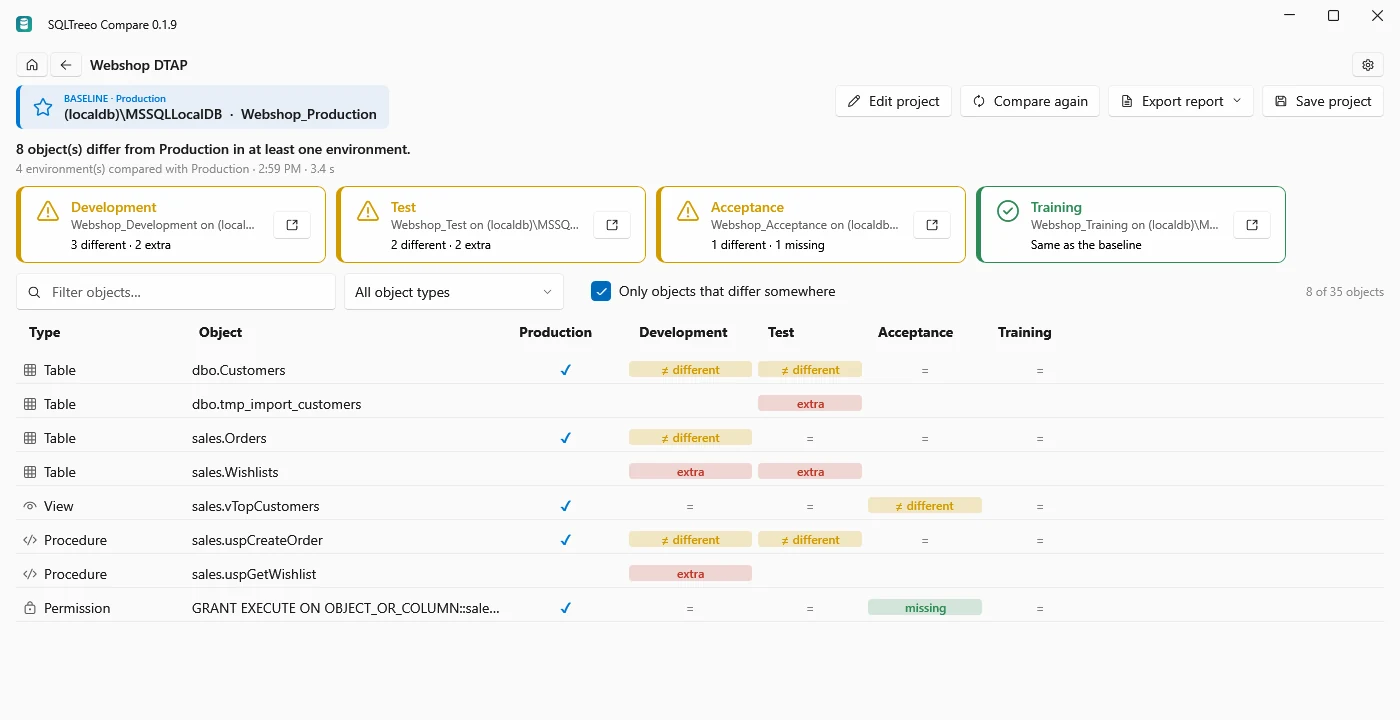
Compare Production with Development, Test, Acceptance and every other environment in one run. One matrix shows which tables, procedures, permissions or server settings differ where.

SQLTreeo Compare: Production compared with Development, Test, Acceptance and Training in one matrix
Why

Is Acceptance really the same as Production?

Every team with a DTAP or OTAP street asks it before a release, and after one. A hotfix that went straight to Production and never came back to Development. A table left behind by an import test. A permission that only Acceptance is missing. With typical schema compare tools, which compare one source with one target at a time, you run a comparison per environment and put the answers together yourself.

SQLTreeo Compare compares one baseline with all of your environments in a single run and shows every difference in one grid: object by object, environment by environment.

How it works

Three steps

  1. 1. Name your environments

    Pick a baseline, usually Production, and add Development, Test, Acceptance or any other database or server. Each gets its own name and connection, and the project remembers them.

  2. 2. Compare

    Every environment is compared with the baseline; up to four are read at the same time. An environment that cannot be reached shows as not compared, and the rest goes on.

  3. 3. Read the matrix

    A tile per environment with its count of differences, and a row per object: = the same, ≠ different, missing or extra. Click a cell to see why.

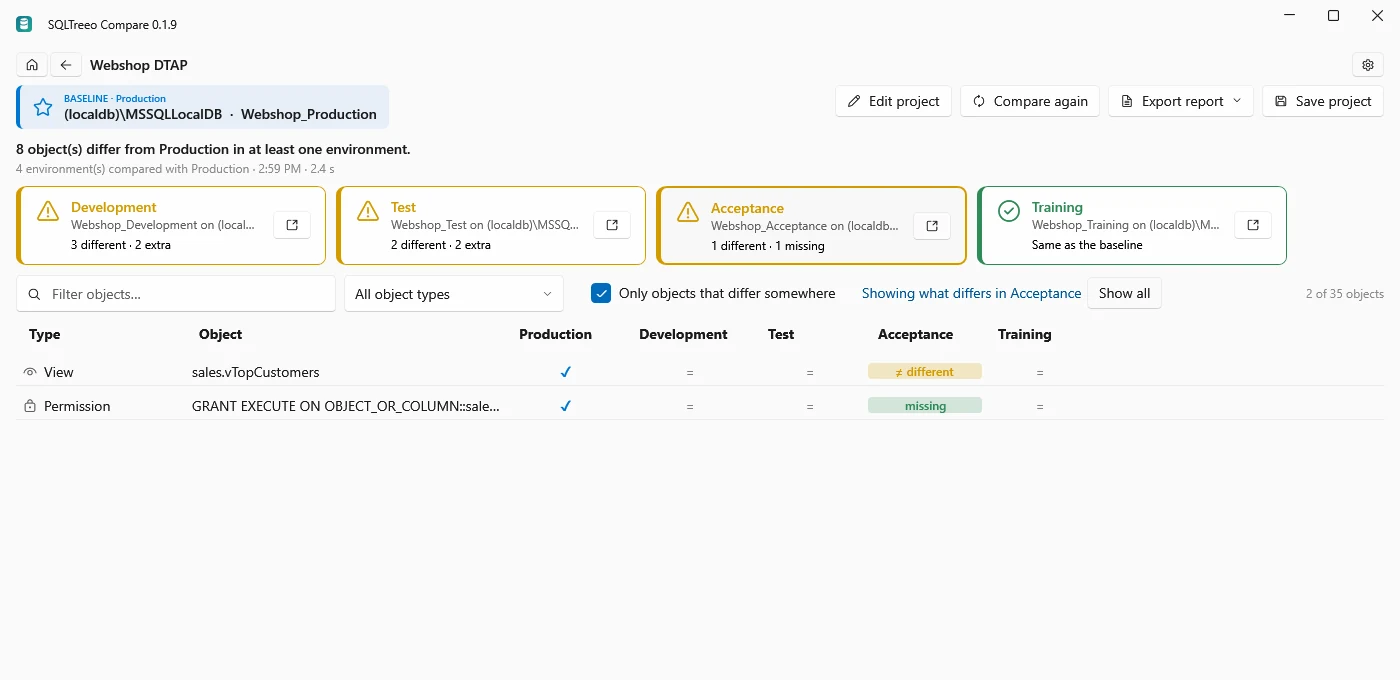
The Acceptance tile selected: only the changed view and the missing permission of Acceptance are shown

See what differs in one environment

Each environment has a tile: green when it matches the baseline, amber when something differs, red when it could not be read. Click a tile and the matrix shows only that environment's differences.

Filter by name or object type, or show every object, including the ones that are the same everywhere.
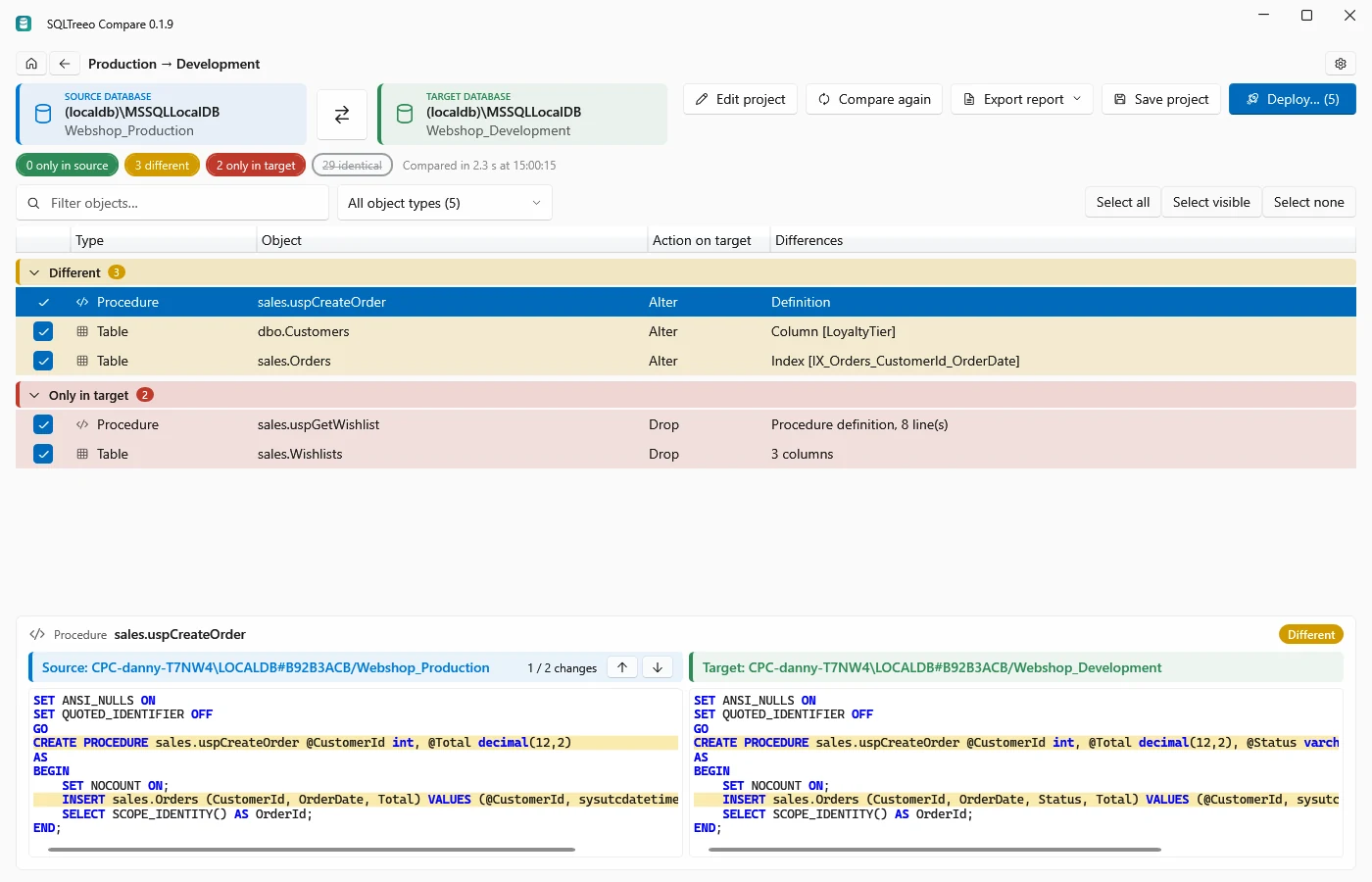
Production compared with Development on the results page, with the changed procedure side by side and the Deploy button

Open any environment and deploy to it

A click on a cell opens the comparison of the baseline with that environment on the familiar results page, with the object already selected: property differences, a side-by-side script diff and the deployment script.

Deploy is aimed at that one environment and runs inside a transaction, with warnings for DROP and data-loss statements first.

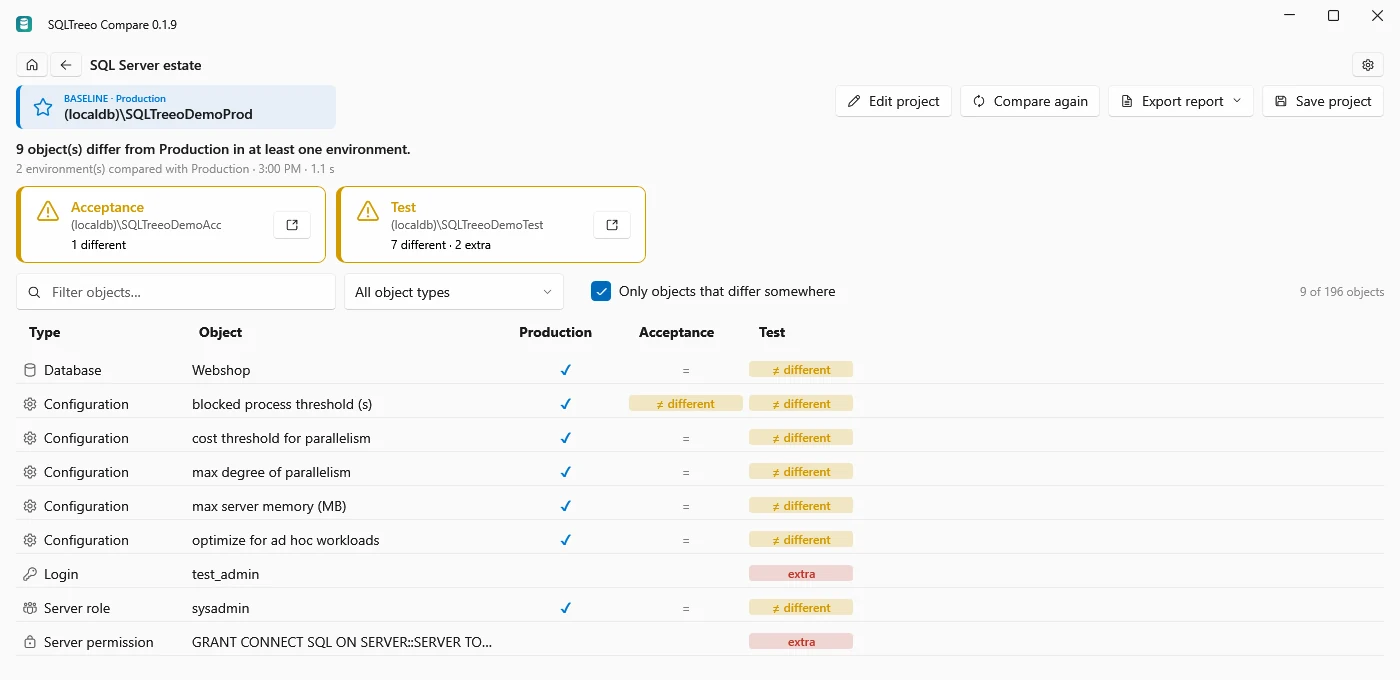
Server configuration matrix: cost threshold for parallelism, max degree of parallelism, max server memory, logins and server roles per server

Your whole SQL Server estate, side by side

For DBAs: choose Server configuration and compare one reference server with every other instance. The matrix shows sp_configure values, trace flags, logins, server roles and permissions, SQL Server Agent, Database Mail, Resource Governor and database options.

Spot the Test server with the default cost threshold, the login nobody remembers creating and the database in the wrong recovery model, in one view.

Guide: find configuration drift across all your servers

sqlcompare environments ^
  -b "Server=prod;Database=Shop;Integrated Security=true" ^
  -e "Development=Server=dev;Database=Shop;Integrated Security=true" ^
  -e "Test=Server=test;Database=Shop;Integrated Security=true" ^
  -e "Acceptance=Server=acc;Database=Shop;Integrated Security=true" ^
  --format html --output drift.html

# exit code 0: every environment matches
#           1: an environment differs
#           2: an environment could not be read

Check every environment from your pipeline

The sqlcompare environments command runs the same comparison without the UI and writes the matrix as text, HTML or JSON. Run it every night or before every release, and let the exit code decide.

Guide: compare Development, Test, Acceptance and Production · Command line reference

No database contents, connection details, passwords, scripts or comparison results are ever sent to SQLTreeo. Every environment is read from your own computer.
Who it is for

Where one matrix saves the most time

Before a release

Check that Acceptance matches Production before you sign off, and that every change reached the environments it should have reached.

After a hotfix

Find the fixes made directly in Production that never made it back to Development and Test, before the next release overwrites them.

Many customer databases

One schema, deployed for many customers or tenants: see in one run which databases are behind or were changed by hand.

Server standards

Compare a reference instance with the rest of the estate and see every server that deviates from your standard configuration.

Audits

Export the matrix as an HTML or JSON report: proof of what was the same and what differed on a given day.

Nightly drift checks

Let a pipeline run sqlcompare environments every night and alert you when an environment drifts.

Screens

See it in action

Click a screenshot to enlarge it.

Questions

Comparing several environments

How is this different from a normal schema comparison?

A normal comparison has one source and one target. To check Development, Test and Acceptance against Production you run three comparisons and combine the results yourself. Here you name a baseline once, add every environment, and get one matrix with the state of every object in every environment.

How many environments can I compare?

As many as you need. Every environment is compared with the baseline; SQLTreeo Compare reads up to four databases or servers at the same time. Server estates with many instances work the same way as a DTAP street.

What happens when one environment cannot be reached?

The comparison goes on. That environment shows as not compared, with the reason, for example a login that failed, and every other environment is compared as usual.

Can I deploy to one environment from the matrix?

Yes. Click a cell, or open an environment from its tile, and the comparison of the baseline with that environment opens on the usual results page. Its deployment script and the Deploy button are aimed at that one environment.

Does it work for server configuration too?

Yes. Choose Server configuration instead of Database schemas and the matrix shows sp_configure values, trace flags, logins, server roles, SQL Server Agent, Database Mail, database options and more, per server.

Can I run it in a pipeline?

Yes, with sqlcompare environments. The exit code is 0 when every environment matches the baseline, 1 when one differs and 2 when one could not be read, and the report can be text, HTML or JSON.

Which version do I need?

SQLTreeo Compare 0.1.9 or later. It is part of the normal license; there is no extra edition.

Compare all your environments today

Download SQLTreeo Compare and choose Compare several environments at once on the start page. The 30-day trial covers every feature; one license is $99 per named user per year.